The iPhone 5 is….. REAL!!!!


Remember how disappointed everyone was back in October when Apple announced an iPhone 4S and not an iPhone 5?

Everyone had been led to believe by scores of reports that there would be a revolutionary new iPhone with a bigger screen and a new slimmer look.

Well, it turns out the “iPhone 5” – or at least, a fully redesigned iPhone – was real and it was scrapped only months before the iPhone 4S was announced.

We’ve been told this by an industry source who has been right about future Apple products in the past.

We have not been able to verify what he told us with a second source.  So we’re still treating these details as rumors. You should probably still read this post with a nice fat dose of salt.

The story our source told us does, however, fit into a broader narrative that is currently being passed around the industry. Because of that we thought you’d like to hear what we heard and make a judgment for yourself.

So, here’s what we were told.

Our source said that Apple engineers he knows thought until about three months before the iPhone 4S was released, that a new fully re-designed iPhone was going to be Apple’s next big announcement.

This source said that he spent about two weeks with one prototype version of this phone.

The prototype had a bigger screen than the current iPhone. It was 4″ diagonal, like this Samsung phone.

The prototype had a bigger screen than the current iPhone. It was 4" diagonal, like this Samsung phone.

Image: Dylan Love

The phone our source played with was not production quality. It was made in-house, out of prototyping material, just like this model.

The phone our source played with was not production quality. It was made in-house, out of prototyping material, just like this model.

The new phones were supposed to have aluminum backs like the iPad 2.
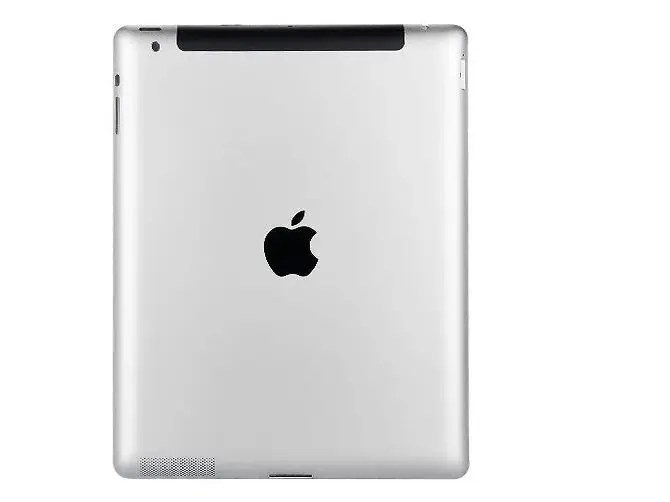
The new phones were supposed to have aluminum backs like the iPad 2.

Eventually, our source hears, Apple wants to use its “liquid metal” technology to make colored iPhones.

Eventually, our source hears, Apple wants to use its "liquid metal" technology to make colored iPhones.

Liquid Metal is like paint made out of aluminum, full-saturated with color. Scratch it, and the color remains.

The prototype our source played with had a screen with a messed up color profile…

The prototype our source played with had a screen with a messed up color profile…

Image: Macrumors

…this leads our source to believe that the iPhone 5 was going to have a nicer screen with better colors.

…this leads our source to believe that the iPhone 5 was going to have a nicer screen with better colors.

Why? He says Apple tends to “ugly up” features it is actually improving in some of its prototypes to disguise them.

The prototype’s home button “was not a physical press button. You could touch it and hold it and physically reboot the device.”

The prototype's home button "was not a physical press button. You could touch it and hold it and physically reboot the device."

Our source says the prototype was “squished” and “flatter” just like the pictures on the Internet guessed.

Our source says the prototype was "squished" and "flatter" just like the pictures on the Internet guessed.

The prototype was MUCH faster than normal iPhones, but that’s because it had its limiter removed to disguise its actual power. Its battery life sucked.

The prototype was MUCH faster than normal iPhones, but that's because it had its limiter removed to disguise its actual power. Its battery life sucked.

Engineers told our source that the new phone was supposed to have a 10 megapixel lens.

Engineers told our source that the new phone was supposed to have a 10 megapixel lens.

Image: Dan Frommer

Finally, our source said the prototype had Siri, but it was called “Assistant.”

Finally, our source said the prototype had Siri, but it was called "Assistant."

So why did the new iPhone not happen?

So why did the new iPhone not happen?

Our source doesn’t claim to know.He says the rumor among Apple employees is that Steve Jobs was unhappy with the bigger screen because it “fragmented” iPhones, Apple’s big argument against Android is the way all the different phones from different manufacturers fragment that operating system.

In the end, we didn’t get a new iPhone. We got the 4S. Will Apple revive the iPhone 5 sometime in the future? Stay tuned to find out.

In the end, we didn't get a new iPhone. We got the 4S. Is it worth buying?
Posted in iPhone | Tagged , , | Leave a comment

Will iOS 5.0.2 Fix Battery Issue?


Apple released the iOS 5.0.1 firmware yesterday to fix numerous issues with battery life that users were facing while running the iOS 5.0 firmware. Although Apple has managed to fix a lot of errors that were associated with the official iOS 5.0 firmware, there are still some users reporting the same battery life problems after updating to the latest iOS 5.0.1 firmware. To make matters worse, some people have even noted that they are experiencing worse battery life after updating.

According to AllThingsD, Apple is indeed aware there are still issues with the iOS 5.0.1 firmware, and they are further looking into fixing the remaining battery life issues. Apple commented:

The recent iOS software update addressed many of the battery issues that some customers experienced on their iOS 5 devices. We continue to investigate a few remaining issues.

If the above statement is indeed true, we are sure to see iOS 5.0.2 released within the next coming weeks

Posted in iPad, iPhone, iPod | Tagged , , , , | Leave a comment

What’s Wrong With Apple’s iOS 5.0.1 Update?


When Apple dropped iOS 5.0.1 to fix the battery issue, yesterday, most of you updated to iOS 5.0.1 to fix the battery issue but the update hasn’t helped. In fact, some users not only claim the battery drain persists, but actually has gotten worse.

There are 275 pages from unhappy customers on this issue, here are just a few comments:

“Installed the new IOS 5.0.1 two hours ago. I started a test at 1:30 CT today. 5% battery drain in 45 minutes with WIFI and location services turned on and me not touching the Iphone 4S. The new update doesn’t seem to help much.”

“Lost 15% in 45 mins and I didn’t even use the phone. What happened? This update is no help. In fact, it drains the battery even quicker.”

“Upgraded to 5.0.1 this morning. Still draining at the exact same rate. Unplugged with a full charge 2 1/2 hours ago, and already down to 80% with light usage.”

“I updated last night (UK) and it didn’t fix anything. Losing 6% / hr in standby which is the same as with 5.0.”

“Updated to 5.0.1 last night and my battery life seems even worse than before! My phone dropped by 4% overnight in flight mode! I have had it out of flight mode since 6.30am (at which time the battery was at 51%), and its now 8.30am and its down to 35%.”

For those jailbreakers who didn’t update to iOS 5.0.1, STAY AWAY if you want untethered jailbreak for iOS 5.

Posted in iPad, iPhone, iPod | Tagged , , , , | Leave a comment

How To Jailbreak iOS 5.0.1 Using Redsn0w 0.9.9b8


As we all know yesterday Apple released iOS 5.0.1 to the public of course Apple announced that this version will fix iPhone battery issue, so for the people who upgraded their iDevices to iOS 5.0.1 they will be able to jailbreak their iDevices using latest version of Redsn0w which is Redsn0w 0.9.b8, and we made a little guide that will help you:

How To Jailbreak iPhone 4 Running on iOS 5.0.1 Using Redsn0w 0.9.9b8: 


STEP 1: Download iTunes 10.5 & iOS 5.0.1

STEP 2: Backup your iPhone, iPad or iPod touch and restore it using the iOS 5.0.1 IPSW file downloaded using iTunes.
STEP 3: Download latest version of Redsn0w 0.9.9b8 from HERE.
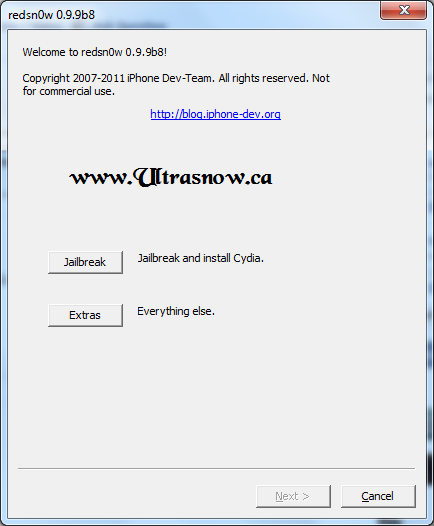
STEP 4: Now, open Redsn0w and simply click on “Extras” then “Select IPSW” and browse for the iOS 5.0 IPSW file (download here) As shown in the picture below:
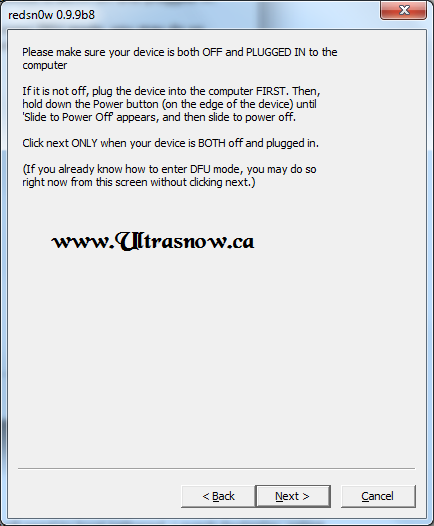
STEP 5: Now click on “Jailbreak” then “Install Cydia”. You’ll need to follow the on-screen instructions to get your device into DFU mode.
STEP 6: Allow it to jailbreak, after that your device will automatically rebooted…
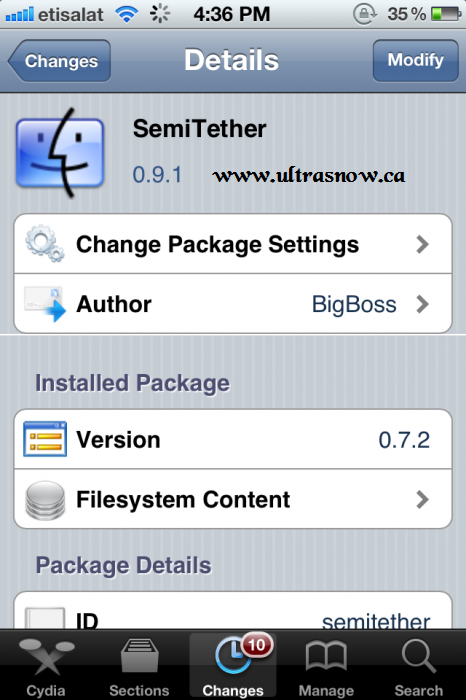
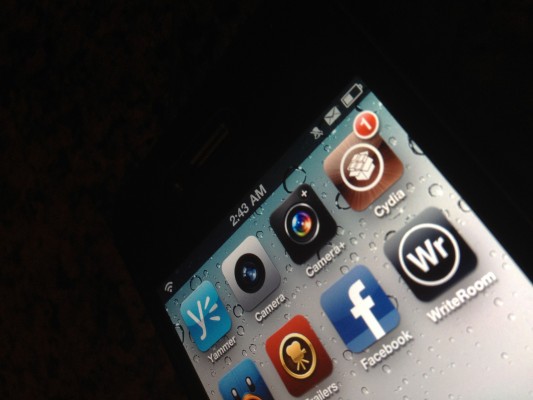
Now you have successfully jailbroken your iPhone running on iOS 5.0.1 after that you should find Cydia on your iPhone, you can also download SemiTethered jailbreak tweak on your iPhone in order to reboot your device without need to a computer to connect to. You’ll lose some functions like opening mail and almost all jailbreak tweaks.
Posted in iPad, iPhone, iPod | Tagged , , , , , , | Leave a comment

Apple Releases iOS 5.0.1 To The Public, Jailbreakers Stay Away!


Apple today released the final version of iOS 5.0.1 for public for iPhone, iPod touch and iPad users. The iOS 5.0.1 software update fixes battery issues on iPhone 4S and bring back multitasking gesture to the original iPad.

Download iOS 5.0.1

You can get the update either by downloading the firmware IPSW file official from Apple or it’s also offered by over-the-air (OTA) feature for those of you who already running iOS 5.0. You can get it by tapping on Settings, General, Software Update.

The update also contains a fix for the security flaw discovered by Charlie Miller. That’s why hackers are warning jailbreakers from upgrading to iOS 5.0.1. If you’re looking forward to getting future untethered jailbreak, iPhone 4S jailbreak and iPad 2 jailbreak, then it’s better to wait.

MuscleNerd also warned from upgrading to iOS 5.0.1 since you won’t be able to downgrade from iOS 5.0.1 to iOS 5:

Official download links from Apple:

Posted in iPad, iPhone, iPod | Tagged , , , , , , | Leave a comment

How To Enable Android-Like Autocorrect Keyboard Hidden In iOS 5 (No Jailbreak Required)


We’ve already seen the panoramic camera mode hidden in iOS 5 and now something interesting discovered by Sonny Dickson. A new feature found in iOS 5 allows you to enable android-like autocorrect keyboard. The method doesn’t require jailbreak and it’s similar to the one of the panorama camera mode.

You’ll need to do a backup for your date via iTunes. Just connect your device into your computer, open iTunes and right click on the iPhone icon then hit backup. Now let’s do it.

STEP 1: Get iBackupBot which can be found here.

STEP 2: Locate your backup from iBackupBot and then find Library/Preferences/com.apple.keyboard.plist.

STEP 3: Open the file and add the below code:

<key>KeyboardAutocorrectionLists</key><string>YES</string>

STEP 4: Save the file and close iBackupBot.

STEP 5: Finally, open iTunes and right click on the icon then hit Restore from Backup and select the backup you edited.

NOTE: For jailbreakers, you can use SSH method better as it won’t need you to restore from backup. You know how to do it!

The iPhone will reboot (and you’ll of course need tethered boot if its jailbroken). You’ll be able to use the awesome autocorrect feature.

Posted in iPad, iPhone, iPod | Tagged , , , , , , | Leave a comment

Hackers’ Warning: Stay Away From iOS 5.0.1!


Apple seeded iOS 5.0.1 for developers and many Apple users updated to their iDevices, but today @Pod2G announce on his Twitter account warning users who are looking forward to jailbreak iOS 5.0.1 not to update it because the bug Charlie Miller discovered a few days ago could make jailbreaking “dramatically easier.” And since Apple is aware of the issue, it will likely patch it in iOS 5.0.1, so he recommends not updating…

This comes as quite an ironic dilemma: Upgrade to 5.0.1 for better battery life and lose jailbreak possibilty, or stay on 5.0 with bas battery life but be able to jailbreak.

And for those of you thinking that you can downgrade to 5.0 if you have the SHSH blobs saved, you’re in for some more bad news. Recall that a while ago we told you that Apple implemented a new scheme of verifying builds, so the saved SHSH blobs don’t work anymore.

Conclusion: If you are on 5.0 now, STAY ON IT, at least for now. We’ll let you know when its safe to update to 5.0.1

Posted in iPad, iPhone, iPod | Tagged , , , | Leave a comment

Apple Secretly Seeding iOS 5.0.1 To End Users Fixing The Battery Life Issue


Releasing the software update earlier to the developers to test out applications and improvements in battery life and Siri, the new update iOS 5.0.1, is now being seeded to selected customers of the iOS for testing. Some customers who have complained about the battery issue are now being seeded a software update of iOS 5.0.1 through the Apple’s AppleSeed Program.


Apple has also warned the people taking part in the program of the situation not being able to downgrade to the previous iOS 5. However they will be able to upgrade to the final version which is expected to release in few weeks.

In addition to the new update being secretly tested; the Apple Retail Stores have received a memo on how to deal with the battery life issue. For now the employees at stores are advised not to replace any phone and to tell the customers on waiting for a few more days until software update is available. So if you are facing such issues. Just Wait!

Posted in iPhone | Tagged , , , , , , | Leave a comment

Reasons Behind Motorola’s Restriction Against Apple In Germany


It is a true phrase that “As you sow so shall you reap”. The real life example of this phrase has been given by the Apple. Every one knows how Apple tried to ban Samsung over the matter of patents. Apple has humiliated Samsung on these matters but still it didn’t have the last laugh. It is famous all over the world that all these multinational corporations try to sue each other only to get ahead of the competition. Some of them succeed while some fail.

It is recent news that on Friday 4th of November 2011, Apple, the same company who tried to ban Samsung on the matter of patents, was sued by Motorola on the same matter. Motorola won the primarily injunction against Apple at Germany.

In the court, the conclusion didn’t mention any Apple products by name, but said that the Apple can’t offer any mobile devices that violate on two Motorola patents related to wireless technology, that makes the iPhone and iPad the most likely to be affected. The court also says that if Apple did not respect this judgement, then it may have to pay a €250,000 on court’s decision.

The only reason why Apple got in this situation was because its representatives never show up in the court and didn’t care about its judgment. So in the end, Apple was not worried about this case as they have already won many cases of patents around the world.

Posted in iPad, iPhone, iPod | Tagged , , | Leave a comment

Enable The Native Panorama Camera Mode WITHOUT JAILBREAK!


Yesterday, we told you how to enable Panorama mode on your iPhone via a jailbreak tweak. Today, we’re going to tell you how to do exactly that WITHOUT a jailbreak.

After Conrad and Chpwn, our well known iOS hackers, exposed the upcoming Panorama mode in Apple’s iOS camera app. While you can install it on jailbroken iDevice, from Cydia by using a jailbreak tweak which available now. For those of you who don’t jailbreak and don’t want to jailbreak but want to enable the native Panorama camera mode, here you are the good news after the break.


Panorama Camera Mode

How To Enable The Native Panorama Camera Mode On Your iDevice

Well, Funky Space Monkey, showed folks over 9to5Mac how to do so, it’s enabled without jailbreak on iDevice and working well. Just follow the tutorial below and tell us if you like it.

Step 1: Hit the link below to download iBackupBot for iTunes:

Download iBackupBot

Step 2: Backup your iPhone or your iDevice in iTunes.

Step 3: Open iBackupBot, find the backup and now load it.

Step 4: Find Library/Preferences/com.apple.mobileslideshow.plist and open the file. (if your software isn’t registered you’ll have to press cancel and then it will open)

Panorama Camera ModeHow To Panorama Camera Mode

Step 5: Now add in the code below:

<key>EnableFirebreak</key><string>YES</string>

Panorama Camera ModeHow To Panorama Camera Mode

Step 6: After saving your modification restore from backup within iBackupBot.

Panorama Mode Enabled!

Posted in iPhone | Tagged , , , | Leave a comment