Why Siri Isn’t Being Released as an iPhone 4 Upgrade


Given the joy which Apple‘s iPhone 4S users have been greeting Siri there’s been some speculation as to why it’s not been released as an upgrade to the iPhone 4. The cynic’s answer, that the joy at getting Siri might spark an upgrade to an iPhone 4S, seems not to be the reason.

It is actually possible to be too cynical, something which comes as a slight surprise.

The answer is that the hardware won’t be able to support it properly. It’s not about processing power, bandwidth or memory. It’s about the technology in the iPhone 4S which dampens background noise and which the earlier iPhone 4 doesn’t contain.

There’s a nice explanation of it here:

To reduce system cost and eliminate the extra package required for the Audience chip, Apple cut a deal to integrate the noise-reduction technology directly into its A5 processor, which appears in the iPhone 4S. This technology is critical for the new phone because not only does it improve call quality, it blocks out background noise when users provide voice commands to Siri, the intelligent assistant built into the iPhone 4S. Without this noise reduction, Siri would be unusable even with a modest amount of background noise.

This situation helps explain why Apple does not offer Siri as a software upgrade on the iPhone 4. Although the older phone includes an Audience chip, the company has since improved its technology to handle “farfield speech,” which means holding the device at arm’s length rather than directly in front of the mouth.

I take it to mean that you could in fact put Siri on an iPhone 4 (which would explain many of those stories about hacks doing just that) but it wouldn’t work very well. And as we know, Apple just hates anything that doesn’t work well. Thus no release as an upgrade for Siri on the iPhone 4.

Posted in iPhone | Tagged , , , | Leave a comment

BlackBerry-Android Poll Results


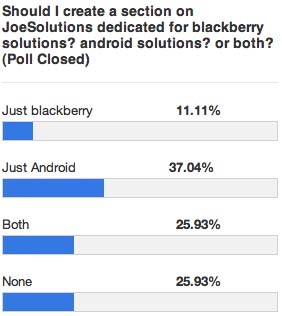
So the poll has closed and here are the results. I guess for now, I’ll be setting up a page dedicated to android users.

In the near future, I will put blackberry up against windows phone and see what happens 😀

Posted in iPad, iPhone, iPod | Tagged , , , , , | Leave a comment

Siri for iPhone 4 NO PROXY NEEDED!!!


Install Siri on iPhone 4, iPod touch 4G without Proxy! Yes you read it right, Today we’ve got great news from JBN for you. Finally you can install Siri on jailbroken iPhone 4, iPod touch 4G without a proxy .

How To install Siri on iPhone 4, iPod touch 4G without Proxy?

Step 1: Go to Cydia > Sources > Edit > Add and add the following repo :

repo.siriport.ru

Step 2: Tab on Search, then search for “Siriport” and install it and reboot your device.

Step 3: Reboot your device.

Step 4: Download this Certificate file From siriport.ru/1.crt or here Direct link.
Note: If you can not download this Certificate on your device, download it from your computer, then email it to yourself, and open it on your iPhone 4, iPod touch 4G from your email.

Step 5: Install the Certificate on your iPhone 4, iPod touch 4G.

Step 6: Reboot your Device.

Step 7: Activate Siri and say “Hi Siri”.

Step 8: It may stuck with you at the first time, wait 1-4 minutes and try again. (Say “Hi Siri” again) until Siri is activated.

Here’s video shows you how to install Siri on iPhone 4, iPod touch 4G without Proxy

Posted in iPhone, iPod | Tagged , , , | 6 Comments

Redsnow Updated to fix iBooks issues


Redsnow has been updated to jailbreak all non-A5 iDevices. This update fixes the iBooks issue.

You can just apply this new version over your existing jailbreak, just deselect Cydia.

Redsnow 0.9.10b5 MAC

Redsnow 0.9.10b5 WINDOWS

Posted in iPad, iPhone, iPod | Tagged , , , , | Leave a comment

Vote Now: Should I add a BlackBerry section? An Android section? Both? or None?


Posted in iPad, iPhone, iPod | Leave a comment

RIM will probably bring BlackBerry Messenger to iPhone and Android


Before the release of iPhone by Apple in the Smartphone world, Major market shares were linked with the Rim’s most popular BlackBerry. But Since Apple has released iPhone or Google’s Android OS came in existence RIM’s market share declined very rapidly. Now android is the Major Smartphone Platform with many Hardware companies While Apple is in the line of Smartphones.

However, one of the most popular things from BlackBerry OS was BBM, BlackBerry Messenger that distinguish it from other Smartphones. By the release of iMessage for iOS, or Chat ON from Samsung, BBM has seen a decline in BBM user’s services due to binding to the same network. Well, if you are BlackBerry users, but want to port to Apple, than we have good news for you. RIM’s new CEO Thorsten Heins said that RIM might release BBM to other platforms. In a interview to a very famous BlackBerry weblog, Crackberry, he said that:

We’re constantly exploring our room to maneuver and our room to explore other businesses so I wouldn’t say categorically no to it,” Heins explained. “There is a time where this might make sense, and I have a team looking into this… I’m open for licensing if it makes sense.”

This will be a good step from RIM to save it’s constantly falling Market shares. With the release of other messengers, RIM does will probably not get many users back to its platform. What do you think? DO you want to use BBM on your iPhone? Let us know in the comments section below.

Posted in iPhone | Tagged , , , , | Leave a comment

Awesome Siri Tweaks!!


For all you iPhone 4S users who are enjoying your new jailbroken iphone, here’s some more good news!

Many Siri tweaks are now found on Cydia and we’re going to tell you about the ones that caught our attention the most 😀

First of all, to be able to install these tweaks, you must have a jailbroken 4S, If you dont, follow our guide here to jailbreak it. Just download the file for your OS, plug your iPhone in and follow the onscreen instructions!

Once that is done, open cydia and search for the following Siri Tweaks:

OpenSiri: With OpenSiri, you can now ask Siri to open ANY APPLICATION ON YOUR IPHONE! It is found in the BigBoss repo which comes bundled with Cydia so no need to add a source.

Siri Mic Colors: Changes the default color of Siri’s mic according to the sound level!! To get this Siri tweak, follow these steps:

Step 1: open cydia

Step 2: go to manage -> sources

Step 3: in the upper right corner, tap edit, then tap add and add the following repo: http://repo.technetec.com then tap ok

Step 4: wait while cydia verifies this repo and adds it.

Step 5: once cydia is done refreshing, search for Siri Mic Colors and download it!

SiriToggles: SiriToggles allows you to ask Siri to switch on/off Wi-Fi, 3G, check battery percentage, adjust screen brightness. It is also found in the BigBoss repo, so just search for it and you should locate it!

VoiceUtils: VoiceUtils adds 4 new commands to Siri: reboot, restart springboard, power off, and enter safe mode.

And finally, probably the best Siri tweak we were able to find is Hands-Free Control.

Hands-Free Control provides a continuous listening service on your device to activate voice functions even while in sleep mode. When you speak the keyword “Siri” (you set a custom keyword as well), Siri will be automatically activated without pressing the home button or any other button!!

To get this tweak you have to add another repo. Follow the steps above on adding repos to cydia however this time add this repo: http://cydia.xsellize.com

When cydia finishes refreshing, search for Hands-Free Control, and you should be able to find!

Happy Jailbreaking!! More Siri tweaks coming soon!

Posted in iPhone | Tagged , , , , , , , , , , , | Leave a comment

Absinthe Updated: Download Version 0.3 To Jailbreak Your iPhone 4S / iPad 2


Absinthe has been updated to version 0.3 to include the linux version as well. Users who jailbroke using v0.2 DO NOT need to reapply the jailbreak!

Absinthe A5 Jailbreak


Download Absinthe 0.3


Posted in iPad, iPhone, iPod | Tagged , , , , , | 1 Comment

Siri for iPad 2 Anyone??


For all you iPad 2 owners who are wondering when Siri will be ported to iPad: Your wait has come to an end! Siri is coming to the iPad 2 courtesy of the A5 untethered jailbreak. Most of you already know that Siri works on the iPhone 4, so with some extra information, you can get it on the iPad 2 as well.

NOTE: A jailbroken iPad 2 is required on iOS 5.0.1. Jailbreak your iPad 2 by following out guide here. You can also follow this tutorial to get a SiriProxy.

STEP 1: Follow our tutorial carefully on Spire, and use it to install SiriProxy, guide posted here

STEP 2: Install Spire on your iPad 2.

Note: You are doing this at your own risk. Your iPad’s screen could look funky as this would make your iPad kick into “iPhone mode” as the size is for iPhone. However, a quick respring should fix this. But, you have been warned.

  • Now open Cydia to download and install iFile and navigate to /System/Library/CoreServices/Springboard.app/. After that press and open the K.plist file (K93AP.plist, K94AP.plist, etc) using the Property list Viewer.
  • Click capabilities, scroll down until you see the iPad. Restart your iPad but before that, switch it from On to Off and click Done.
  • Once back up, start Cydia and install Spire after which it will ask you to reboot again.
  • Once back up, head back into /System/Library/CoreServices/Springboard.app/ with iFile. Once there, click and open K.plist file (K93AP.plist, K94AP.plist, etc) using the Property List Viewer.
  • Click capabilities, scroll down until an iPad is visible. Switch it from Off to On and press Done and exit iFile.

Step 3: Install Dropbox after downloading it, log in, and download ca.pen file placed there when you went through the initial Siri Proxy Tutorial. (Choose it, copy link, paste link in the Safari Browser). Now a Install Profile window should open where you choose install and tap Done.

STEP 4: Open iFile and navigate to /etc/. Click hosts and choose Text Viewer. Click Edit in the upper-left hand corner and enter the following line.

127.0.0.1 guzzoni.apple.com

Click Save > Done.

STEP 5: Start the Settings app and go to General > Siri. Enable Siri.

STEP 6: Start the Settings app and under Extensions, choose Spire. Enter the following in the Proxy Host field:

https://guzzoni.apple.com

STEP 7: Start iFile and navigate to /var/mobile/Library/Preferences/. Once there, click and open com.apple.assistant.plist.

Click on Accounts > Select your hex key (this will be a random alphanumeric value) and enter the following three fields utilizing the “+” sign in the bottom right-hand corner and press Done:

  • Ace Host
  • Assistant Identifier
  • Speech Identifier

STEP 8: Start Settings > Wi-Fi > and Choose the right blue arrow corresponding to the Wi-Fi connection. Change the DNS field to the IP address of your Siri Proxy Server. You can always follow our SiriProxy Tutorial for help.

STEP 9: Exit Settings, and by pressing and holding the Home button, run a Siri test. Just like on the iPhone 4, you should see it work.

STEP 10: Some cool plugins like SiriToggles work very well on the iPad 2.

Let us know what happens and stay tuned for more!

Posted in iPad | Tagged , , , , | Leave a comment

Celeste Tweak Get’s Updated To Support iOS Devices Running On iOS 5.0.1


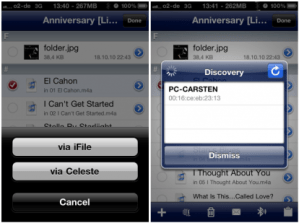
Well here’s some good news for all iPhone users who are running their jailbroken devices on iOS 5.0.1, today we would like to tell you that Celeste the popular app get’s updated to support devices running on 5.0.1, the tweak is very good that offers Bluetooth from your iPhone to any other device and other more features:

For those guys who haven’t heard about Celeste, it is a very popular and useful app that  this tweak, which for convenience we will call simply “Heavenly” is the only package available in Cydia that allows you to send and receive files via Bluetooth seamlessly with IOS. One of the limitations of the iPhone (and Apple mobile devices in general) is in fact not allow the exchange of data using this (although for some obsolete) technology.


Now we just have to wait for new developments directly from the team. Over the months we have learned that these developers are among the most rapid updating of its tweaks, but certainly their quality and functionality are well above the average of the programs available through Cydia.
Posted in iPad, iPhone, iPod | Tagged , , , | Leave a comment