OSX Also Plagued With Same SSL/TLS Bug As iOS


MAC USERS, DON’T USE SAFARI FOR THE TIME BEING!!! The SSL/TLS bug discovered in iOS versions prior to 7.0.6 also affects OSX except the iOS bug has been patched but no patch exists for OSX.

What this bug does is present an extremely easy/exploitable vulnerability for a man in the middle attack, which means that your mac cannot correctly authenticate SSL/TLS connections which means that malicious servers/users could pose as non-malicious servers/users and compromise your sensitive data (financial transactions, credentials, etc…)

While this bug affects all apps on OSX that use SSL/TLS at least not using Safari, which is susceptible to this bug, and using Firefox/Chrome, at least until Apple pushes a fix for this, will improve your odds or not compromising your data.

Posted in iPad, iPhone, iPod | Tagged , , , , , , , , | Leave a comment

The Lazy SSL Fix


For those of you who are running an iOS version earlier than iOS 7.0.6, you should update right now (my recommendation) or at least install Ryan Petrich’s SSLPatch…

In case of you don’t want to update your iOS device to version 7.0.6, you should install SSLPatch, this awesome new Cydia tweak that patches the iOS SSL vulnerability.

SSLPatch

SSLPatch jailbreak tweak will fix the SSL connection verification issue, but it’s not the best nor a perfect fix. Restoring the device then updating to iOS 7.0.6 is the best choice. However, you can install SSLPatch right now for free from Cydia, until you update your iPhone, iPad or iPod touch and jailbreak your iOS 7.0.6.

How To Install SSLPatch To Protect iOS 7

tap on the Manage tab
tap on the Sources button
tap on the Edit button
tap on the Add button
enter the following URL and then tap Add Source: http://rpetri.ch/repo/

Posted in iPad, iPhone, iPod | Tagged , , , , , , , , , | Leave a comment

UPDATE TO iOS 7.0.6 IMMEDIATELY!!!!!!!!


Yesterday, Apple pushed iOS 7.0.6/6.1.6 as a security update for SSL/TLS but gave no details. We learned that HTTPS hasn’t protected users’ credentials and privacy for around a year.  Don’t use your iOS device if it’s not updated to iOS 7.0.6/6.1.6. People (with no special talent, just basic knowledge about sniffing) can grab any of your passwords without you noticing now that they know there is a security vulnerability in iOS versions prior to 7.0.6/6.1.6.

If you’re device is jailbroken, you might think that its not worth it to restore firmware, update it, then restore from backup but trust me if you don’t update and someone sniffs your password(s) or eBanking sensitive data you’ll wish you had taken those 15 minutes to make sure your device is running iOS 7.0.6/6.1.6.

For those of you who are code savvy and are interested to see what this patch fixed, have a look below:


static OSStatus
SSLVerifySignedServerKeyExchange(SSLContext *ctx, bool isRsa, SSLBuffer signedParams,
                                 uint8_t *signature, UInt16 signatureLen)
{
	OSStatus        err;
	...

	if ((err = SSLHashSHA1.update(&hashCtx, &serverRandom)) != 0)
		goto fail;
	if ((err = SSLHashSHA1.update(&hashCtx, &signedParams)) != 0)
		goto fail;
		goto fail;
	if ((err = SSLHashSHA1.final(&hashCtx, &hashOut)) != 0)
		goto fail;
	...

fail:
	SSLFreeBuffer(&signedHashes);
	SSLFreeBuffer(&hashCtx);
	return err;
}

(Quoted from Apple’s published source code.)

Note the two goto fail lines in a row. The first one is correctly bound to the if statement but the second, despite the indentation, isn’t conditional at all. The code will always jump to the end from that second goto, err will contain a successful value because the SHA1 update operation was successful and so the signature verification will never fail.

This signature verification is checking the signature in a ServerKeyExchange message. This is used in DHE and ECDHE ciphersuites to communicate the ephemeral key for the connection. The server is saying “here’s the ephemeral key and here’s a signature, from my certificate, so you know that it’s from me”. Now, if the link between the ephemeral key and the certificate chain is broken, then everything falls apart. It’s possible to send a correct certificate chain to the client, but sign the handshake with the wrong private key, or not sign it at all! There’s no proof that the server possesses the private key matching the public key in its certificate.

Since this is in SecureTransport, it affects iOS from some point prior to 7.0.6 (It was confirmed on 7.0.4) and also OS X (confirmed on 10.9.1). It affects anything that uses SecureTransport, which is most software on those platforms although not Chrome and Firefox, which both use NSS for SSL/TLS. However, that doesn’t mean very much if, say, the software update systems on your machine might be using SecureTransport.

For a more complete read on this issue press here


Posted in iPad, iPhone, iPod | Tagged , , , , , , , , , , | Leave a comment

Untethered Jailbreak for iOS 7.x.x FOR ALL DEVICES Released!


So we’re really surprised with the new this morning about the iOS 7.x jailbreak released by evad3rs team. Evasi0n7 gives you the ability to jailbreak your iOS 7.x device in few minutes. Below is a full step-by-step guide to show you the whole jailbreak process!


STEP 1: Download Evasi0n7 for Mac OS X/Windows.

STEP 2: Download your iOS 7.x.x from our download page.

STEP 3: Make sure to backup all your data on your iPhone using iTunes or iCloud before using Evasi0n7 untethered jailbreak.

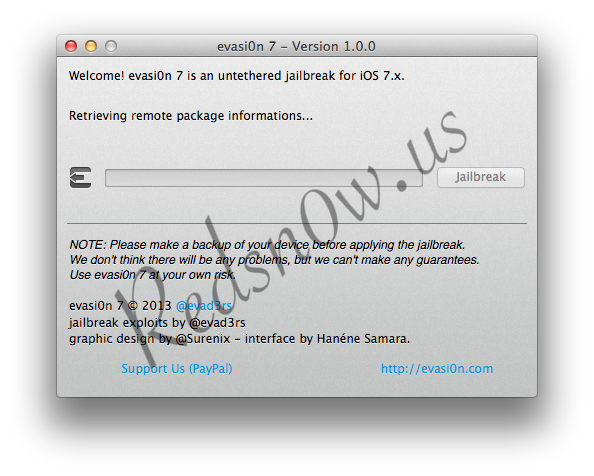
STEP 4: Launch Evasi0n7 and plug in your device to the computer then click on “Jailbreak” button.

STEP 5: Now Evasi0n7 will start the jailbreak process, so sit back and enjoy.

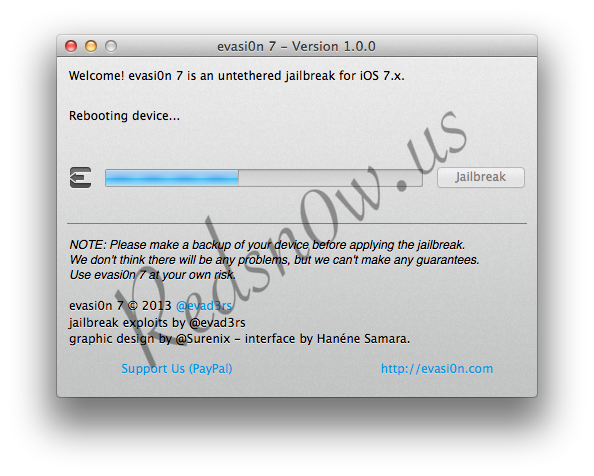
STEP 6: Evasi0n7 will reboot your device.

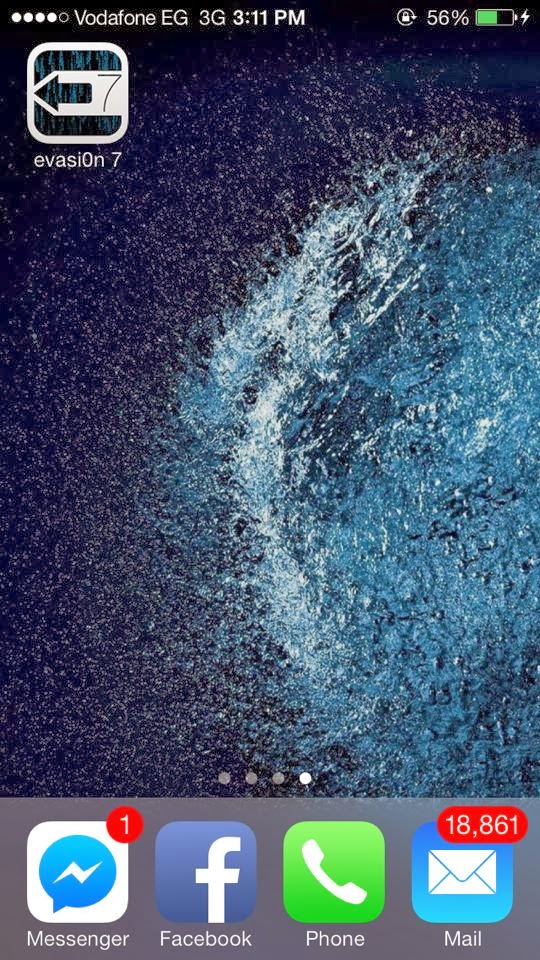
STEP 7: After done, an app of Evasi0n7 will appear on your iPhone’s homescreen. Tap on it.

STEP 8: Your device will be rebooted again.

STEP 9: Evasi0n7 will continue processing your jailbreak and will reboot your iPhone for several times until the jailbreak is done.

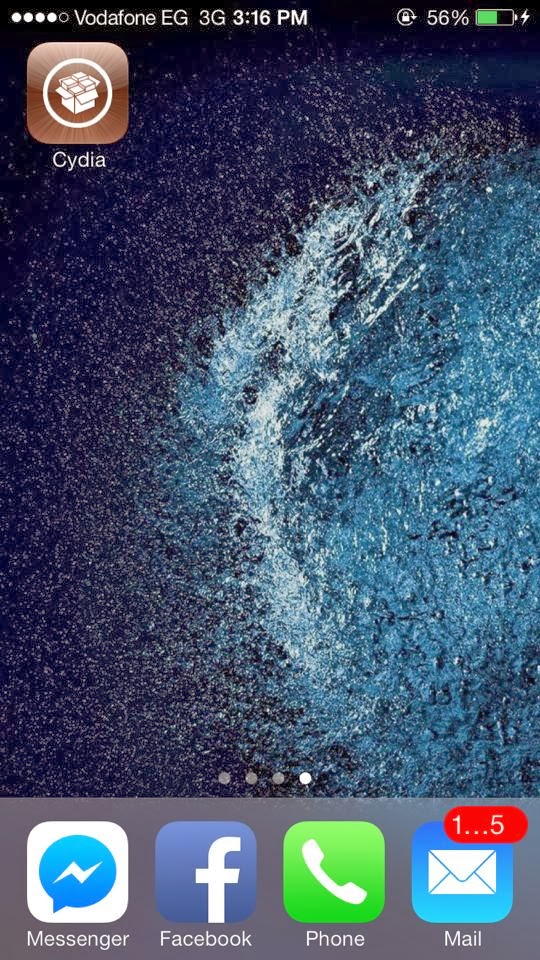
STEP 8: Cydia is here and you are ready to go..

Source: Redsn0w.us
Posted in iPad, iPhone, iPod | Tagged , , , , , , | Leave a comment

Facebook App Restored To App Store


It seems that the critical bug in Facebook’s incremental 6.7.1 update has been squashed and the app has been restored to the app store. Feel free to update and let us know if you still are facing any issues!

Posted in iPad, iPhone, iPod | Tagged , , , , , , , , | Leave a comment

Don’t Install Facebook 6.7.1!!!


iOS customers are reporting massive issues with the Facebook application for iPhone and iPad, following a bug-fix release that was supposed to alleviate some woes.

People who thought Facebook 6.7 was bad just learned the hard way that the 6.7.1 update is even worse.

“I just tried to update 6.7.1 on my iphone 4 and it froze? I tried to shut phone off and on and still no luck. Can I delete it and download facebook again? Will I loose my contacts?” writes one frustrated customer.

Another Softpedia reader says, “The 6.7.1 update made the problem more worse to most users. It is suppose to bug fix the problem of 6.7 version from crashing, but instead it made facebook app not usable for many because it can’t be downloaded.”

Reader Logan Snow seems to confirm that the issue is widespread: “It’s a terrible update it says its a ” bug fix ” oh dear it just crashes Facebook & freezes on the update,” he writes.

Finally, user Mik says “Couldnt download facebook app. What is the problem?”

Unfortunately we can’t answer Mik’s question, or anyone else’s for that matter, regarding the issues with Facebook 6.7.1. All we know right now is that it’s a bad Apple and that it should be avoided.

The 6.7.1 update apparently causes the Facebook iOS client to become completely unusable, making the previous version – buggy as it may be – seem like a good place to camp out until the Social Network releases a fix.

Similar comments to the ones cited above keep trickling in, meaning the problem is affecting numerous customers.

It would help if commenters mentioned their iOS version and iDevice model in the comments, to try and assess which users are the most affected.

We encourage you to try and help Facebook contain these bugs by providing some technical information on your end.

Posted in iPad, iPhone, iPod | Tagged , , , , , , | Leave a comment

OSX Mavericks Possible Problem (And Solution!)


So OSX Mavericks has been released and, what’s more, as a free upgrade for ALL MAC USERS! After downloading the file (a whopping 5.29 GB), users might be faced with a problem saying that OSX Mavericks cannot be installed on this disk because it is being used as a Time Machine Backup as seen below.

Screen Shot 2013-10-23 at 9.01.59 AM

Note that the highlighted disk is actually the hard drive of the Mac!

The culprit turns out to be the folder on the hard drive named Backups.backupdb
This folder is located when you first enter you hard disk. Go to Finder, then press on the hard drive’s name and you should find Backups.backupdb there.

First of all, it is very important that you back up using Time Machine and on an external disk (or Time Capsule).

After making sure you have your backups somewhere safe, simply drag the folder Backups.backupdb to the Trash BUT DON’T EMPTY THE TRASH!
(unless you have saved your backups on an external disk and want to permanently delete the backups from your mac).

Then drag the folder from the Trash to Desktop.

After this, Mavericks’ installer will allow you to install Mavericks on your Mac’s hard drive. Depending on your machine’s speed the installation should take between 60 and 90 min. After successfully installing Mavericks, drag Backups.backupdb from the desktop back to its original location and you should be fine!

UPDATE:

If you are unable to find this folder on your hard drive, here is another approach that will work:

1) Open terminal

2) Type the following command to temporarily disable local Time Machine backups

sudo tmutil disablelocal

3) Enter your admin password

4) Install OSX Mavericks

5) When Mavericks finishes its installation, to turn local Time Machine backups back on type the following command

sudo tmutil enablelocal

6) Enter your admin password

7)Enjoy Mavericks!

Let us know if this helped you in the comments section!

Posted in Uncategorized | Tagged , , , , , , , | Leave a comment

iOS 7.0.3 Released


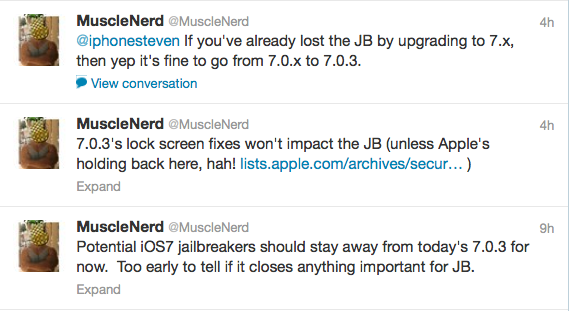
iOS 7.0.3 has been released for all supported devices. Go ahead and update as it is safe for prospective jailbreaks as confirmed by MuscleNerd. At first he asked users to wait before updating but we can see from his tweets that it is indeed safe to update.

Screen Shot 2013-10-23 at 7.34.35 AM


Posted in iPad, iPhone, iPod | Tagged , , , , , | Leave a comment

Apple iPad Event LIVE


So here is the full roundup of what happened today at the Apple iPad event. Start reading from bottom to top though and tomorrow I’ll be posting a more concise version of all what has happened at this event!

Brian Barrett

More detail on everything announced today? I am glad you asked, I can do that for you, here come some links.2:26pm

Brian Barrett

So that’s where we’re at, kids. Lots of spec bumps, some new details.2:24pm

Brian Barrett

Okay, we’re done! No band, no big surprise, just a hale fellow well-met.2:24pm

Brian Barrett

Tim Cook has returned, he is recapping again, he will recap until there is nothing more to recap and you will like it.2:23pm

Brian Barrett

Actually that was just a guess, I lied, it shows how the iPad Air

is as thin as a literal pencil (although so was the old one if your pencil was big enough?2:22pm

Brian Barrett

For the new iPad Air. It shows people who hate their iPads. Kidding! They all love their iPads.2:21pm

Brian Barrett

Oh nope, nevermind, we get… an ad.2:21pm

Brian Barrett

Or a surprise band saying goodbye.2:21pm

Brian Barrett

Here’s where we either get a band or a new surprise or a goodbye.2:21pm

Brian Barrett

Tim Cook recaps better than anybody in the recap game, I tell you that righ tnow.2:20pm

Brian Barrett

HEre comes Tim Cook again, talking about what a wonderful time it’s been for innovation etc. Talking iPhone, iOS 7.2:20pm

Brian Barrett

Not entirely clear what’s new about them but they are NEW.2:19pm

Brian Barrett

And full-wrap overs for $80.2:19pm

Brian Barrett

Now we’re talking about covers, there’s a brand new iPad Air and mini cover for $40.2:19pm

Brian Barrett

And the LTE version is going to be $530.2:19pm

Brian Barrett

Available in late November. So it’s… more expensive? Old iPad mini sticks around at $300 down from $330.2:18pm

Brian Barrett

Whoa wait starts at $400 for 16GB.2:18pm

Brian Barrett

10 hour battery life, same MIMO Wi-Fi. Same general list of updates as iPad Air, including cameras and colors and LACK OF GOLDPAGNE.2:18pm

Brian Barrett

Also gets an A7 chip, which is nice. You might actually want to buy one now! Assuming there’s no price drop though after iPad Air held firm.

2:17pm

Brian Barrett

At 7.9 inches. This really was the single biggest gripe about the iPad mini.

2:17pm

Brian Barrett

It’s going to get a retina display finally. 2048×1536.

2:16pm

Brian Barrett

Not to say it sells poorly at all, just we don’t know.

2:16pm

Brian Barrett

Talking abotu how it’s a big hit with customers, although we still I don’t think have ever gotten actual iPad mini sales numbers out of Apple?

2:16pm

Brian Barrett

iPad mini time now.

2:16pm

Brian Barrett

Which is probably fine? Just in terms of use cases, less likely to need that kind of security on somethng that lives on your nightstand.

2:15pm

Brian Barrett

Worth noting that there’s no Touch ID here.

2:15pm

Brian Barrett

Or just fun SYNERGY.

2:14pm

Brian Barrett

iPad Air also lends itself to being abbreviated as an IPA, which should cause fun confusion for beer fans?

2:14pm

Brian Barrett

Also we’re watching an iPad Air video.

2:13pm

Brian Barrett

It makes more sense to buy 405 dollar bills with $400 than it does to buy an iPad 2 with it.

2:13pm

Brian Barrett

Cannot repeat this enough, you should not under any circumstances buy a $400 iPad 2.

2:13pm

Brian Barrett

Which means we’re going to be getting record iPad sales numbers in a few weeks as well.

2:12pm

Brian Barrett

Ships November 1, including in China.

2:12pm

Brian Barrett

Do not buy an iPad 2 for $400.

2:12pm

Brian Barrett

And no price drop either, it’ll be $500 for 16GB and $400 for iPad 2.

2:12pm

Brian Barrett

Repeat there will be no goldpagne iPad.

2:11pm

Brian Barrett

And will be in silver/white and SPACE GREY/black but no goldpagne.

2:11pm

Brian Barrett

It’s got dual microphones, 1080p video, new FaceTime camera (presumably the same old new FaceTime camera from the iPhones).

2:11pm

Brian Barrett

It’s also getting MIMO tech, which basically means you’re going to get better Wi-Fi on there. Also a 5MP camera, better backside illumination.

2:10pm

Brian Barrett

And s twice as fast at opening large files.

2:10pm

Brian Barrett

it’s up to 8x faster performance, 72x faster graphics performance.

2:10pm

Brian Barrett

(Also Apple quoted Gizmodo in this so that’s nice, thanks Apple).

2:10pm

Brian Barrett

And that M7 motion processor that also kind of sort of tracks you all day erryday but don’t worry abotu that right now.

2:09pm

Brian Barrett

And it’s got a fancy A7 chip from the iPhone 5S.

2:09pm

Brian Barrett

They’ve been working on this for “years,” as with all Apple products and all products generally. It weighs a pound, down from the 1.4 pou

nd previous gen.

2:08pm

Brian Barrett

Which is a difference of slightly under two mm, but it still shows.

2:08pm

Brian Barrett

On the bezel, that is. The body itself is 20% thinner.

2:07pm

Brian Barrett

And it does look very, very trim! 43% thinner than previous model, specifically.

2:07pm

Brian Barrett

It’s also getting a new name: iPad Air.

2:07pm

Brian Barrett

Papa iPad now looks more like the iPad mini, with that very slim bezel and new dimensions.

2:06pm

Brian Barrett

Okay more hype more hype, talking about the 9.7 inch iPad prime now. Another video.

2:06pm

Brian Barrett

For those keeping score at home on a giant “How Many iPads Are There” wall.

2:05pm

Brian Barrett

And here comes the next generation, which is the fifth generation.

2:05pm

Brian Barrett

Apple just showed someone using an iPad hangliding, and I can’t tell if that means that I’ve wasted my life or that guy has wasted his.

2:04pm

Brian Barrett

Again, I’m very, very curious about iPad pricing. There’s very very little chance they’ll try to stoop down the Kindle or Nexus levels, but the table’s set for them to at least get more competitive on the mini?

2:04pm

Brian Barrett

And now there’s a short video about iPads, that I would like to preemptively sum up the same way.

2:03pm

Brian Barrett

I’d like to sum this up for you by saying I am fairly confident that Tim Cook likes iPads and likes that you like iPads.

2:02pm

Brian Barrett

There are over 475,000 iPad apps available now, and those are specifically designed for tablets (presumably plus universal apps).

2:02pm

Brian Barrett

Which is almost certainly true! Kindle Fire and Nexus 7 are great but they haven’t captured hearts and minds.

2:01pm

Brian Barrett

And Apple quotes stats that say it’s used more than 4x all other tablets combined.

2:00pm

Brian Barrett

Recently sold the 170 millionth iPad, which is a nice milestone.

2:00pm

Brian Barrett

Taking a swipe at netbooks now which is like Roger Goodell taking a swipe at the XFL, it’s over, you won.

1:59pm

Brian Barrett

Apple just called the iPad “magical and revolutionary” which is just worth noting, although they’re quoting themselves from earlier.

1:59pm

Brian Barrett

Good transition, right?

1:58pm

Brian Barrett

Talking up how they’re making so much software free, and now time for the iPads they’ll be using them on.

1:58pm

Brian Barrett

Tim Cook is back now, saying we’ve “only scratched the surface” about what these apps can do.

1:57pm

Brian Barrett

Especially since the iPad mini was already overpriced, there I said it.

1:57pm

Brian Barrett

Apple’s been pushing price drops so much today you start to wonder about the iPad and iPad mini… maybe?

1:57pm

Brian Barrett

And all iWork apps are free on Mac and iOS devices, downloadable today.

1:56pm

Brian Barrett

And that’s it for iWork. Hard to say if this is enough to lure you away from Google Docs (probably… not? Since you’re already using Google Docs for everything so why switch?).

1:56pm

Brian Barrett

They keep showing this Eddy Cue music poster and it’s only making me crave an Eddy Cue band more. Eddy Cue and the Cueballs. Come on.

1:55pm

Brian Barrett

The share button is easy enough to find; it’s in the toolbar on the web. Just click it and go.

1:55pm

Brian Barrett

We can build our Eddy Cue music posters together, is what I’m saying.

1:54pm

Brian Barrett

And there are collaboration tools now (yay!) for iWork in iCloud.

1:54pm

Brian Barrett

You can also generate iCloud links to documents, which will fire up iWork for iCLoud web app on either a Mac or PC.

1:54pm

Brian Barrett

(That’s hypothetical Eddy, Eddy is not the one running the demo, apologies for any confusion, apologies to Eddy).

1:53pm

Brian Barrett

Eddy is fussing with his poster to give it different looks with ease, but no matter how many different fonts he uses he can’t hide his raw animal magnetism.

1:53pm

Brian Barrett

Wouldn’t you buy that? Or at least stream it?

1:53pm

Brian Barrett

In this case, a poster for Eddy Cue’s “new album” which please why doesn’t Eddy Cue release a real album.

1:52pm

Brian Barrett

They’re just going to demo one of the new features, which is opening up a poster in Pages.

1:52pm

Brian Barrett

For this presentation, I mean. I wish that had been revealed with a little more relish.

1:52pm

Brian Barrett

And Keynote, which offers new effects and animations, and which Apple has been using THIS WHOLE TIME.

1:51pm

Brian Barrett

Numbers now, which gives you interactive charts (live-updating, basically).

1:51pm

Brian Barrett

There’s also a context-sensitive format panel for Mac, so different controls refrlect what you’re working on.

1:50pm

Brian Barrett

It’s more powerful, easier to do things, but most importantly there’s full file compatibility across iOS, Mac, and web.

1:50pm

Brian Barrett

Pages, Numbers, and Keynote all get a redesign and a brand new UI.

1:50pm

Brian Barrett

All three are available today.

1:49pm

Brian Barrett

Oh and of course you can buy additional drummers through in-app purchases.

1:48pm

Brian Barrett

Anyways, it was “powered by the best session musicians in the world,” which means different drummers have different sounds.

1:48pm

Brian Barrett

Virtual drummers are are more reliable but less fun than real drummers I’m guessing? Can my virtual drummer do that little drumstick twirl thing at the top of every track? That’s what I look for most in a drummer.

1:47pm

Brian Barrett

Oh and a better drummer! Virtual drummers, that play along with your track to your direction.

1:46pm

Brian Barrett

Best new feature: Start a song on iOS, you can open it and finish up on a Mac.

1:46pm

Brian Barrett

Garageband now, which supports 16 tracks instead of 8, and has a new look and new sound library for Mac.

1:45pm

Brian Barrett

iMovie Theater is a new feature that puts all your videos and trailers in one convenient home movie house of horrors (if you, like me, are terrified of home movies).

1:45pm

Brian Barrett

And speed up/slow down effects, which again will be great for your unfortunate music videos.

1:44pm

Brian Barrett

Cueis describing it as “desktop-class effects” on the iPhone or iPad, with a focus for all on browsing and sharing.

1:44pm

Brian Barrett

iMovie next, which has gotten an iOS 7 overhaul as well.

1:43pm

Brian Barrett

iPhoto has an iOS redesign, and photobooks can now be created on the iPad.

1:43pm

Brian Barrett

There are new versions of iPhoto, iMovie, and Garageband, all integrated iwth iCloud and all 64-bit.

1:42pm

Brian Barrett

We’re going to talk about iLife now, which as predicted gets an update.

1:42pm

Brian Barrett

No wait apps, he’s here to talk about apps.

1:41pm

Brian Barrett

Now here comes Eddie Cue to talk about what he had for lunch.

1:41pm

Brian Barrett

Lots of wonderful shots of computer guts, and that’s it for Mac hardware today.

1:41pm

Brian Barrett

Also not super applicable here but a good chance to use the word cham

fering.

1:40pm

Brian Barrett

We’re seeing the factory that makes the enclosure, which is a good chance to say that I am a big fan of Apple highlighting manufacturing processes in these videos.

1:40pm

Brian Barrett

It’ll be assembled in the US, which we knew before. 2000 people over 20 states helping to build it. And now here’s a video!

1:39pm

Brian Barrett

All before “the end of the year” which is still frustratingly not an actual day.

1:37pm

Brian Barrett

And that gets you 3.7GHz quad-core Xeon, 12GB DRAM, Dual FirePro D300 GPUs.

1:37pm

Brian Barrett

Now talking to photo folk, music folk. It’ll start at $3000.

1:37pm

Brian Barrett

Which seems like it wouldn’t matter MUCH now but which is going to matter a whole lot in the next year or two.

1:36pm

Brian Barrett

Showing off some practical applications other than “conversation piece.” Video editing up first, in particular 4K video.

1:36pm

Brian Barrett

4SB 3 ports, 6 thunderbolt 2 ports (for all your… thunderbolt… accessories?) two gigzbit Ethernet, HDMI, and that 802.11ac wireless standard.

1:35pm

Brian Barrett

If you have that many 4K displays presently I would like to hang out, I will bring popcorn and a certain jaunty tone.

1:35pm

Brian Barrett

It supports upt to three 4K displays, single and dual-output displays.

1:34pm

Brian Barrett

All user-accessible, all in a very discrete little evil-r2-d2 package.

1:34pm

Brian Barrett

It comes with dual workstation GPUs standard, AMD FirePro graphics, up to 7 teraflops of computing power.

1:33pm

Brian Barrett

Up to 30MB L3 cache, 40 lanes of PCI Express gen 3, all of which is to say it will be a very competent workhorse.

1:33pm

Brian Barrett

More details coming now, it comes with Intel Xeon E5 with 4, 6, 8, or 12 core versions.

1:32pm

Brian Barrett

Going over the design now, which is both supercool and also vaguely reminiscent of a small trash bin.

1:32pm

Brian Barrett

Mac Pro time now, we should be getting pricing and shipping.

1:31pm

Brian Barrett

Apple’s also making my “buy refurb” strategy tough by cutting prices dramatically, grumble.

1:31pm

Brian Barrett

That’s a pretty futureproof laptop at a not insane price.

1:31pm

Brian Barrett

The 15-inch model also gets a $200 price break, from $2200 to $2000 for quad-core i7, 8GB RAM, 256GB SSD, ships today.

1:30pm

Brian Barrett

Although unless you’re a heavy gamer or pro-user you probably should! They’ve gotten much better the last coupld of years.

1:30pm

Brian Barrett

The 15-inch gives you a GeForce GT 750M discrete graphics option, for those who still don’t trust Intel’s integrated graphics.

1:29pm

Brian Barrett

And it’s for a 2.4 GHz Core i5, 5GB RAM, 128GB SSD.

1:29pm

Brian Barrett

That’s for the 13-inch by the way, and it starts shipping today.

1:28pm

Brian Barrett

Used to cost $1500, now it’s $1300.

1:28pm

Brian Barrett

Oh but hey now it’s $200 cheaper.

1:28pm

Brian Barrett

Basically take the MBA update and apply it to the MBP, which is a good thing, it was a good update.

1:28pm

Brian Barrett

Comes with PCIe SSds, like the MBAs have, and also 802.11ac wireless networking, which the MBAs also got.

1:28pm

Brian Barrett

It’s “up to 90 percent faster” although that leaves a lot of room for vagueness. Basically: it’s faster, its battery life will be longer.

1:27pm

Brian Barrett

Haswell included, this is a good thing! The 13-inch is also just under 3.5 pounds now and .71 inches thin.

1:27pm

Brian Barrett

Which the MBA got a few months ago. Both the 13-inch and 15-inch are getting updates today.

1:26pm

Brian Barrett

Here comes the MacBook Pro though, which should be getting an update to Haswell, which is Intel’s fancy new processor.

1:26pm

Brian Barrett

And rightly so, the MBA is the best laptop, full stop, and has been for a couple of years.

1:26pm

Brian Barrett

Talking MacBooks now, specifically the recent MacBook Air update, which reviewers lurved.

1:25pm

Brian Barrett

So you just saved a few dozen dollars, well done team, we did it.

1:25pm

Brian Barrett

2007 iMacs and Mac Pros, 2008 MacBook Air, MacBook, and Mac Pro, 2009 Mac mini and newer can all get OS X Mavericks and it won’t cost a dime.

1:25pm

Brian Barrett

Windows 8 will cost you a couple hundred bucks, but no matter what Mac you have (within reason, back to Snow Leopard) you can update totally free.

1:24pm

Brian Barrett

That’s unprecedented and terrific.

1:24pm

Brian Barrett

OS X Mavericks is free. Whoa!

1:23pm

Brian Barrett

They’re going for faster releases for the last several years, with new pricing and new speeeeeed.

1:23pm

Brian Barrett

But it’s coming up; they want to get it in “as many hands as possible.”

1:23pm

Brian Barrett

And that was your OS X Mavericks demo! Short and sweet, still no release date yet.

1:22pm

Brian Barrett

Data Detectors let you click on dates and times in emails and they’ll go to your Calendar app. Or click on a location and end up in Maps.

1:22pm

Brian Barrett

Looking at Safari’s accelerated scrolling now, for when you can’t get through that tab fast enough. Other new features include shared links with search, etc. It is hard to make browser updates exciting, we’re learning this.

1:21pm

Brian Barrett

Worth noting that iPhoto, Pages, Keynote, etc. all have new app icons, which means they’ve probably gotten a bit of an update.

1:20pm

Brian Barrett

And can be sent by sites. Like, say, you want a sportball update from ESPN (or whomever!), you can get that on your desktop.

1:20pm

Brian Barrett

Most of these features were laid out a few months ago but refreshers are always nice? Notifications can happen without having to switch apps.

1:19pm

Brian Barrett

This demo is covering things as specific as copy/past drag and drops, so we’re going REAL GRANULAR here guys.

1:18pm

Brian Barrett

We’re looking at Pages now, opening up a doc. Looking at iBooks with multitouch gestures for page navigation.

1:17pm

Brian Barrett

Improved multiple display support, that is. And here comes the demo.

1:16pm

Brian Barrett

Now for the feature improvements. Notifications are more convenient, finder has tags, Maps and Books are new and improved, multiple display support, etc.

1:16pm

Brian Barrett

Integrated graphics also support OpenCL now, so tasks run 1.8x faster relative to the CPU. Which I believe we also knew at WWDC.

1:15pm

Brian Barrett

Basically it’s smarter about using up the right amount of resources for the right tasks.

1:15pm

Brian Barrett

Which should make things zippier. As for graphics, integrated graphics are improved, with OS X dynamically scaling GPU RAM allotment based on workload.

1:15pm

Brian Barrett

Mavericks also can compress inactive memory, which means you can squeeze 6GB of data into 4GB of system RAM.

1:14pm

Brian Barrett

(All of this is just listed numbers, FWIW, so real-life gains are who-knows-what).

1:13pm

Brian Barrett

And that’s without any hardware tweaks, that’s to an existing 13-inch MacBook Air.

1:13pm

Brian Barrett

Power efficiency is important in OS X, with “deep and broad changes” across the system to give you up to an hour more browsing on a single charge.

1:13pm

Brian Barrett

(Fourth area of focus: adorability?)

1:12pm

Brian Barrett

There are three areas of focus: technologies, features, and apps. Which again, good base-covering.

1:12pm

Brian Barrett

We’d heard a lot about OS X Mavericks at WWDC, but hopefully we’ll gets some detail and a release date here.

1:12pm

Brian Barrett

Okay now into new products. First up: OS X.

1:11pm

Brian Barrett

Cook has referred to “our competition” a couple of times (in this case frowning on netbooks) but I miss when he names names.

1:11pm

Brian Barrett

Now BRISKLY onto desktops and notebooks. Pointing out the quality of hardware and software and apps, which pretty much covers all bases.

1:10pm

Brian Barrett

Which is obviously fine! Why would you want to do that. Users have downloaded apps over 60 billion times.

1:10pm

Brian Barrett

There are over a million apps available in the App Store now, which my god, you will never live to see every app.

1:09pm

Brian Barrett

It has 20 million listeners, though, which is one of the benefits of being baked into iOS 7. One billion songs played.

1:09pm

Brian Barrett

Now Tim is hyping iTunes Radio, which is fine except that there’s not toooo much to hype if you already use literally any other streaming radio service?

1:08pm

Brian Barrett

There’s so much more parallax in the world than there was a two months ago.

1:08pm

Brian Barrett

iOS 7 was downloaded to 200 million devices in the first five days, and nearly two-thirds of devices are running it now.

1:08pm

Brian Barrett

Called iOS 7 the “biggest release” since the original iPhone.

1:07pm

Brian Barrett

Tim Cook storms the stage again, or at least walks back out on it.

1:07pm

Brian Barrett

One could go so far as to say that these people have an unhealthy relationship with their phones? But I am not a phone-love doctor.

1:06pm

Brian Barrett

Here’s our rundown of various stores, people buying phones, people loving phones, people wanting to enter monogomous relationships with their phones.

1:05pm

Brian Barrett

Having a billion more potential customers tends to help with sales!

1:05pm

Brian Barrett

Apple sold 9 million iPhones in the launch weekend, which was the biggest ever, but also the first time the iPhone launched in China.

1:04pm

Brian Barrett

Here we go with some updates, a little bit of iPhone recap. You remember iPhone don’t you?

1:03pm

Brian Barrett

Not surprisingly, Tim Cook loves the video that Tim Cook just showed.

1:03pm

Brian Barrett

And Tim Cook takes the stage, wishing everyone a good morning.

Posted in iPad | Tagged , , , , , , , , , , , | Leave a comment

Apple iPad Event October 22, 2013


apple ipad event october 2013So today is the day! Here are some of the things we might be seeing tonight:

– iPad 5 and iPad mini 2 Touch ID sensor

– iPad 5 and iPAd mini 2 Gold color option

– iPad mini 2 retina display

– Updated processors for both devices (A6x for iPad mini 2 and A7 or A7x for iPad 5)

– 8MP rear cam for iPad mini 2

Hopefully these will be confirmed tonight among others!

Moreover, we can expect some talk about OSX Mavericks tonight hopefully with a very soon release date if not today!

Also, word of iOS 7.1 release is set to accompany the new iPads, so if Apple will start shipping the new iPads today, expect iOS 7.1 as of today. And with the release of iOS 7.1, we might be seeing a jailbreak for iOS 6.1.3 and iOS 7.0.2 quite soon.

Furthermore, Apple did not release the new line of Macbook Pros this year, so we might also be hearing something about them today. We’re quite to see their performance seeing as they will be equipped with the new Intel Haswell processors 😀

Anyways, make sure to tune in for updates as they happen from the event today! The event starts at 6:00 pm GMT (8:00 pm Beirut time)


Posted in iPad | Tagged , , , , , , , , , | Leave a comment