
Trusted sources report that iPhone 5 will be released in the US on September 5, and around the world starting October 5.




Flag Counters
Trusted sources report that iPhone 5 will be released in the US on September 5, and around the world starting October 5.
For those of you still wondering, an untethered jailbreak means that you can reboot your iDevice without having to plug it into a pc or a mac to rerun a jailbreaking program.
Few months ago, the iPhone hacker i0n1c has found untethered exploit which was used till iOS 4.3.3. 12 days ago, Comex released JailbreakMe 3.0 to bring the first iPad 2 jailbreak to the world. 2 days ago, Apple released iOS 4.3.4 to close Comex’s PDF jailbreak exploit and prevent iPad 2 jailbreak.

Surprisingly, Apple didn’t close only Comex’s exploit. iOS 4.3.4 has killed i0n1c’s exploit too forever. In other words, some hacker must find a new untethered exploit for iOS 4.3.x or wait till iOS 5.
According to @i0n1c on Twitter:
For those that did not get it: iOS 4.3.4 does not only fix jbme3 as announced, but also silently kills the ndrv_setspec() integer overflow.
In addition to that iOS 4.3.4 also adds code to dyld to detect attacks with binaries using “incomplete code signing”.
“Incomplete codesigning attacks” were used for all untether exploits from at least iOS 4.1.0
Wonder if {Apple] only tried to stop my xploit from modifying LCs at runtime with the new check, or if they knew it would stop [incomplete codesigning] attacks
So please stay away from iOS 4.3.4
Apple has just released iOS 4.3.4 for iPhone,iPod and iPad and that’s not like any new release, but this new iOS will block JailbreakMe 3.0 exploit by Comex, anyway I just want to tell all users not to upgrade to iOS 4.3.4 because you will not be able to use JailbreakMe for your iOS device, so it looks like Apple is getting nervous.
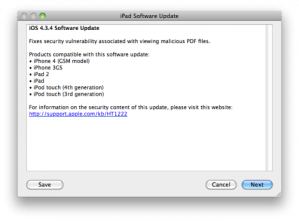
iOS 4.3.4 Supports devices :
 Hey guys, so as you all probably know, C0mex has released Jailbreakme 3.0 which jailbreaks iPad 2 running iOS 4.3.3
Let me explain a bit how this jailbreak works: This is a PDF jailbreak. When you access the site, a PDF file which contains some code is downloaded onto your iDevice which installs cydia for you. However, you might wonder: “If a PDF file is jailbreaking my device, couldn’t another malicious PDF file ruin my device?” The answer unfortunately is YES.
Now, Have no fear Joe Solutions is here. A nice snippet code has been written to fix this problem. So after you jailbreak your device, please go to cydia and install a package by the name “PDF Patcher 2“. This patch fixes the exploit which is originally used to jailbreak the iDevice, and don’t worry, your jailbreak will be preserved.
For all the patient iPad 2 users, today is your lucky day! Make sure you are running iOS 4.3.3 on your iPad 2 and navigate to http://www.jailbreakme.com and set your iPad 2 free!
Here are some notes and issues that users have already reported. Make sure you read them before starting the jailbreak process.
After weeks of waiting and talking wrong ETAs, Comex has finally released JailbreakMe 3.0 to give your iPad 2 a simple and easy jailbreak. JailbreakMe 3.0 is the first untethered jailbreak for iPad 2 since it was released. Some users are experiencing some problems, issues, bugs with JailbreakMe 3.0 so we’ve made this post to cover everything related to JailbreakMe 3.0.

In case you’re new to the jailbreak world, you must know these things. JailbreakMe 3.0 is a PDF exploit just like its previous version Jailbreak Me 2.0. It decreases the time you need to jailbreak your device. Unlike Redsn0w, Greenpois0n, Sn0wbreeze and PwnageToool, JailbreakMe is a userland jailbreak tool (which means that you don’t need to connect your iOS device to your computer to use it, just from Safari browser). By taking advantage of a PDF exploit in Mobile Safari, it can execute code straight from your phone, jailbreak it and install Cydia.
JailbreakMe 3.0 will only work on this devices:
That’s a good question. You’ve to save SHSH blobs of iOS 4.3.3 right now because Apple is about to release iOS 4.3.4 to fix JailbreakMe 3.0 exploit and you may update to it by mistake. In case that happens, you’ll be in a safe area since you have your SHSH blobs saved. You can always restore to a specific iOS using SHSH blobs of it which Apple prevents. So go use TinyUmbrella (from here) to save iOS 4.3.3 SHSH blobs now.
Yes, there’s of course some problems with the iPad 2. Every positive must have a minus. You can’t save SHSH blobs for iPad 2G since since it has a baseband that runs a different firmware from iOS. iTunes will not be able to sign your baseband and it’ll refuse to boot and give you a 1004 error. The sad thing about JailbreakMe is it’s not a bootrom exploit on the A5 bootrom. To sum it up, SHSH blobs for iPad 2G will be useless as you’ll not be able to restore back to iOS 4.3.3. JUST STAY AWAY FROM iOS 4.3.4.


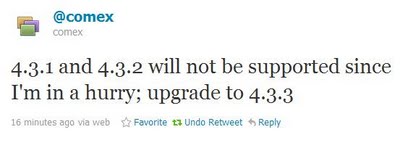
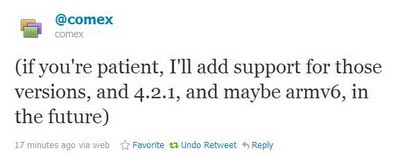
Take in consider that Comex will update JailbreakMe 3.0 to fix more bugs and add support for older devices. He was in hurry to release JailbreakMe 3.0 before Apple release iOS 4.3.4 so he released it with iOS 4.3.3 only support.
Here at Joe Solutions, we keep you up-to-date on everything related to the iOS community. So if you classify yourself as an iPad 2 owner who just cannot wait to get your hands on the jailbreak, here is the unofficial way to do it!
Before anything, it is very imminent, but if you are insisting on your iPad 2’s Jailbreaking and can’t wait wait for Comex to release JailbreakMe 3.0 [May be today], Please keep reading. If you can wait, it’s better to wait.
Every one knows two facts:
After a bit of digging I happened across a relatively inconspicuous comment that lead me to believe that the “unable to download jailbreak files” was attempting to connect directly to Comex’s server (located at 157.22.252.87) in order to download the existing jailbreak files. However, the files attempting to be downloaded were the exact same files that had already been leaked earlier in the day, they simply existed in a separate location.
My first thought was to spoof a local webserver with the same IP that the jailbreak is connecting to in order to make it look for the files there instead. After a bit of tinkering around I finally managed to bypass the 403 error and successfully jailbreak my iPad 2!
He set up his jailbreak on Mac and he says that it can work on Windows too. Here is the step by step guide via iamnayr but be aware that JailbreakMe 3.0 is not released yet and it’s better to wait as we said before.
Here’s how to do it yourself:
My setup is as follows: Macbook Pro 2010 running the latest Lion GM build.
I see no reason why this wouldn’t work on any version of Snow Leopard and can probably be easily tweaked to work with windows as well.

Simply login to your routers existing IP and look for the option to change it. This is very straightforward.
Setup your computer:

Next click over to the TCP/IP settings and fill them out to match the following:

Now click over to the DNS tab and fill it out with your router IP as follows:

Finally hit “OK” followed by “Apply” to save your new settings. Confirm that you can still access the internet.

Backup (to somewhere else) any files that exist in this directory and delete them all. You will likely be asked to confirm your password while doing so.
Download and extract the following file: http://cl.ly/323Y2Y1I2V3G403X1l2K
Go inside the extracted folder called “jb”. Go back into your system preferences and click the “Open computer website folder” button again. Move the contents of “jb” (not the root folder) inside of your computer website folder.
It should look like the following:

Open your browser and type 157.22.252.87 in the browser. You should see the following:

If you don’t look over the previous steps again and modify as neccessary.
Setup your iPad:
Now, on to the iPad.
Open your settings and click over to the “Wi-FI” tab. Modify your settings to match the following:
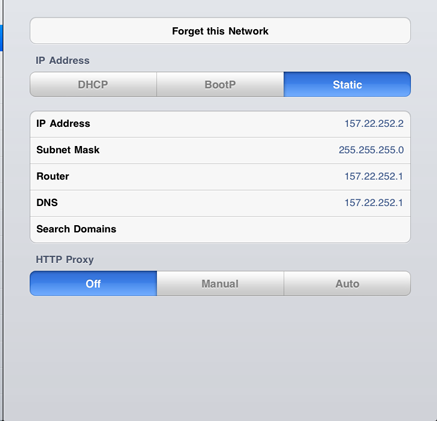
OK. Now open Safari and confirm you can still access the internet. We are nearing the end!
And to finish it off!
Finally type 157.22.252.87 into Safari on the iPad and load it. You should see the same directory listing as you do when loading it on your computer.
Click into the directory called “Saffron”. Now you will need to select the PDF file specifically for your iPad 2 version and type. This will differ depending on what iPad 2 you have, as far as I know clicking on the wrong one will simply close Safari with no other effects. Again I take no responsibility if something goes awry.
For the iPad 2 Verizon 32gb edition on 4.3.3, I used the “iPad_4.3.3_8j2.pdf”. Your browser will close and Cydia should start loading on your home screen.
Once it is done loading, you WILL HAVE TO RESTART YOUR IPAD.
Congrats! You’ve made it through and now have a fully untethered jaibreak for your iPad 2!
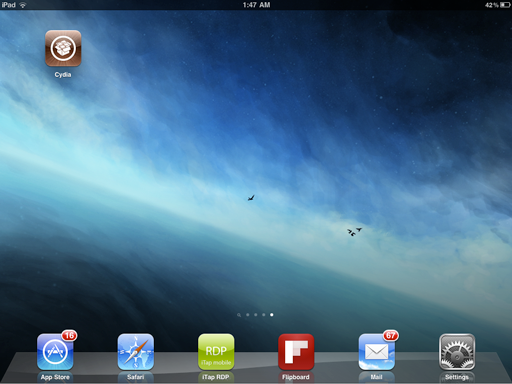
Troubleshooting:If you received an “error unable to load jailbreak files” or a “403 error”, you did something wrong. Go back through the guide and make sure you followed every step exactly as listed.
To all Ipad 2 owners, please note that the jailbreak which is to be released by comex in the next coming hours is only compatible with firmware 4.3.3 so I advise you to update and wait for http://www.jailbreakme.com to come online again to jailbreak your iPad.
Here is the 4.3.3 link for iPad 2 Wi-fi.
Here is the 4.3.3 link for iPad 2 GSM.
Here is the 4.3.3 link for iPad 2 CDMA.
This is the official statement by C0mex, from his twitter account:
I’m sure you all can’t wait to get your hands on this, and so your wait might just be around 24 more hours! Here’s the full story:
A few days ago, the iPad 2 jailbreak entered its beta phase, which means that its done and a couple of bugs are getting ironed out. Today this happened:
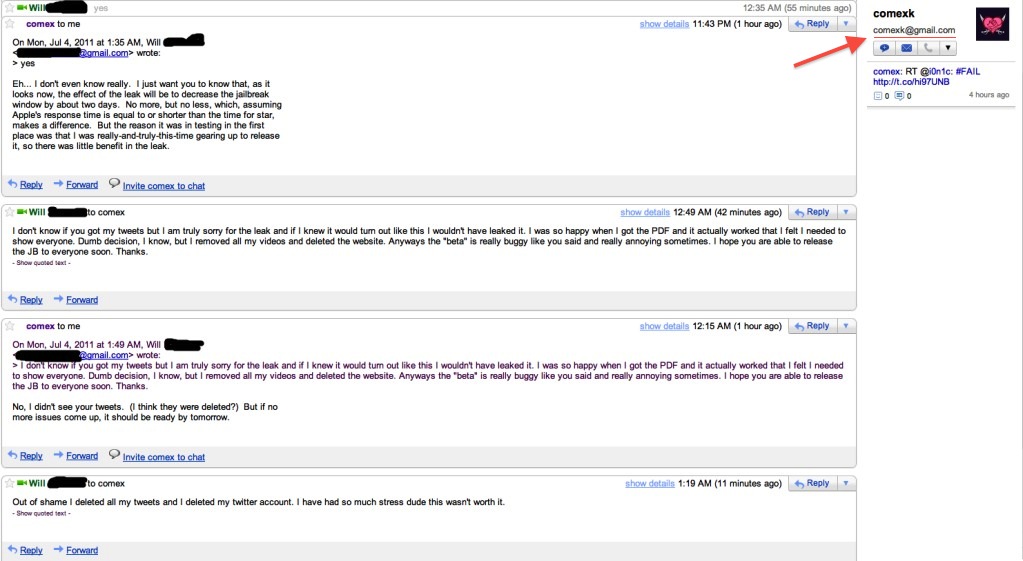
A screenshot of an email conversation between Comex and Will Sayer after the iPad 2 jailbreak leak reveals that the official jailbreak may be released within the next day.
MultiMediaWill (Sayer) posted the following message on MacRumors:
“As a few of you know, comex wanted to talk to me by email. This is an exact copy of the emails to me. It appears that he confirms the JB release date. This may be a setup by him of some sort so take it as you want.”
According to the screenshot comex tells Sayer at 1:49AM on July 4th:
“No, I didn’t see your tweets. (I think they were deleted?) But if no more issues come up, it should be ready by tomorrow.”
Depending on how you read this, it suggests that Comex could release the jailbreak on July 4th or July 5th.
You can see the screenshot below; however, please note we are unable to verify its authenticity. (Click on the image to view it full size)
Here is a speculation of what might be the next major release from Apple, Notice that the main changes are larger screen, thinner size, and an aluminum back cover replacing the former glass back cover.

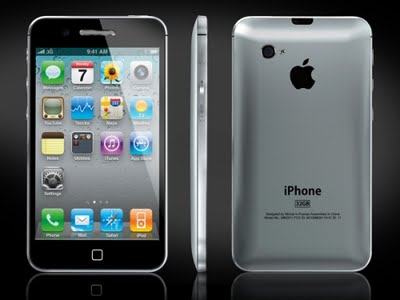
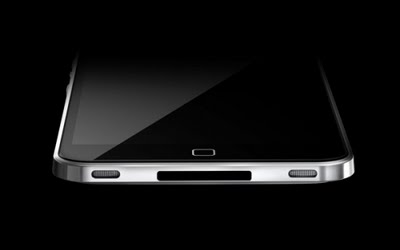
 Don’t forget to leave your thoughts on the new design!
 Recent market rumors have indicated that Apple’s next iPhone (Rumored iPhone 5), will likely come with a dual LED Flash. Everlight Electronics, Edison Opto and Lite-On Technology are being suggested as potential suppliers. All the related companies have denied any involvement in the production of the LED flashes.
The rumors come amid market reports indicating that Apple reduced its orders for Lumileds high-power LED flash products from Philips recently and switched the orders for LED flashes to Taiwan makers.
Industry sources also state that Everlight and Lite-On have strengthened their deployments in the smartphone market for a while, so it would be no surprise to see their products in the next iPhone. The sources also noted that Edison Opto has a high chance of winning the dual LED flash orders from Apple because of their production of high-power LEDs and shipments to other handset vendors.
Weeks ago, a rumored case leak of the iPhone 5 featured a relocated flash opening. However, this new information could mean the relocation was actually making room for the dual LED Flash.
Stay tuned for more iPhone 5 leaks!
(Sorry for the picture, this is the only available leaked image)
 JoeSolutions