
The Blackberry app for iOS and Android has officially released!
Head over here to read about it and download it 😀
The Blackberry app for iOS and Android has officially released!
Head over here to read about it and download it 😀
 I came across an awesome review of the iPhone 5S. It really sheds light on everything the iPhone is and also what it isn’t.
I really suggest you guys check it out here
Apple has finally released iOS 7 final IPSW for iPhone 5S, iPhone 5C, iPhone 4S, iPhone 4, iPad 2, 3, 4 and iPod touch.

iOS 7 Download Links:
Also, iOS 7.0.1 has been out for the iPhone 5s and iPhone 5c. The update fixes a Touch ID bug and users will update as soon as they receive their new devices.
Only two days after Apple’s iPhone event where it unveiled the iPhone 5c and iPhone 5S with a 64-bit A7 chip, Samsung’s co-CEO, Shin Jong-kyun announced that the company was working hard to make its own 64-bit processor to rival the iPhone 5s.

Shin implied at a weekly meeting with chief executives of Samsung’s key affiliates that upcoming Samsung Galaxy-branded smartphones will be more powerful and faster by confirming that they would have 64-bit processing capability.
He also said that 64-bit smartphones won’t hit the market “in the shortest time. But yes, our next smartphones will have 64-bit processing functionality.”
Just because Apple beat everyone to the punch, it was already known that 64-bit chips would be coming within the next couple of years, with or without Apple. It was definitely an expected move by Apple though and it is obvious it has left Samsung scrambling to catch up.
Your move Samsung.

The iPhone has a fingerprint scanner now. Great. It will make your iPhone more convenient (or a pain in the ass) to unlock. But unlocking is sort of beside the point when it comes theft. The truth is, Apple didn’t give the iPhone 5S the one feature that could actually help get a stolen phone back—one that goes perfectly with a fingerprint scanner.
What is it? Requiring a fingerprint scan—or even a passcode scan—to turn the iPhone off. Why? It’s the one thing that will actually help get your iPhone back.
It’s so, so simple. Every cop or theft victim or, frankly, person with a functioning human brain, knows that the first thing any iPhone thief does now is turn the phone off, so that you can’t track down the phone with Find My iPhone. Because if they don’t, the cops show up. By making turn off a secure function, your phone would be trackable for as long as the battery holds out.
It’s crazy that a feature like this hasn’t been put into place already, right? Even just with the passcode? So much effort has gone into features like Find My iPhone and Windows Phone’s Find My Phone and Android Device Manager, and yet you skirt around them just by turning off the damn phone. It would be like a car company making a car alarm that calls the police and sends images of the face in the driver’s seat to the owner of the car, but which can be disabled by pressing a button on the dashboard.
Yes, you potentially leave your information exposed if your phone is on. But not if you have a lockscreen enabled. And even if you don’t, thieves aren’t after your old emails. They just want the hardware.
And there’s no downside here! There has never been a time when you have had to power your phone all the way off (which you probably do verrrrrry rarely anyway) and just COULD NOT TAKE THE TIME to punch in a code or scan your finger. It’s a nominal additional step to an infrequent use. And the payoff is you have a much better chance of getting your phone back if it goes missing.
Will there still be ways to disable the phone and wipe it even with a secure-off feature? Of course. There always will be. But selling fingerprint scanning as an anti-theft measure is laughable if you’re not going to put in the very simplest theft deterrent, which it should be said could be done without a gimmicky new scanner.
(From Gizmodo)
iOS 7 Untethered Jailbreak State – Yes, believe it or not we’re already talking about this – Yesterday, soon after the release of GM version of iOS 7, a prominent member of Evad3rs, Planetbeing, tweeted that their Jailbreak community has started working out to find the vulnerabilities in iOS 7. Evad3rs are working hard to apply the previous exploits on iOS 7, So that they can release the iOS 7 Jailbreak for final version of iOS 7.
Recently, Planetbeing tweeted that they have Achieved unsigned userland code execution from the previous codes of iOS 6 Jailbreak. He also added that now they have a good platform for poking the kernel. Here’s what he tweeted:
Achieved unsigned userland code execution with some of our stuff in reserve. Now we have a good platform for poking the kernel.
— planetbeing (@planetbeing) September 11, 2013
Now while this does not mean that they are anywhere near releasing an untethered jailbreak, we can assume that they nailed the first step of the hectic process of achieving an untethered jailbreak. We hope that the developers will release the jailbreak not to long after the release of iOS 7.
Apple’s executives are on-stage at the company’s Town Hall campus in the company’s Cupertino, California headquarters. Head honcho Tim Cook kicked off the long-expected keynote at 10am Pacific / 1pm Eastern with his usual barrage of Apple biz stats (they don’t call him a numbers guy for nothing).
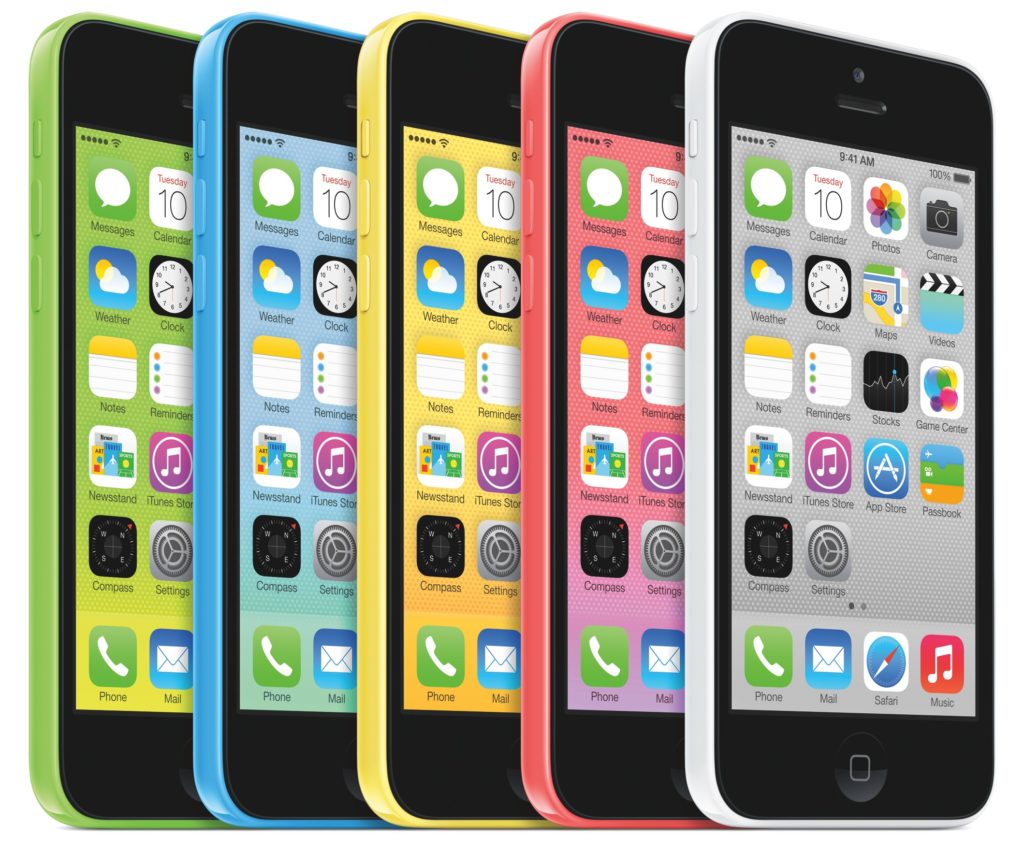
And now, the company has officially taken the wraps off a product critics said would never see the light of day: a more affordable iPhone. They are calling it the iPhone 5c and it’s basically the existing 2012 iPhone 5 hardware redesigned around a polycarbonate plastic enclosure with a black front face and your choice of one of the five brightly colored backplates: red, blue, yellow, green and white.
“In the past, we’ve lowered the price of the iPhone, making it accessible to more people,” Tim Cook teased before unveiling the web’s worst-kept secret, the iPhone 5C name.
“We’re not doing that this year,” he added.

The device borrows much of the internals from the current-generation iPhone 5, including the A6 chip, the eight-megapixel iSight camera on the back. However, it has a slightly bigger battery. Oh, there’s also a four-inch Retina display with the same 1,136-by-640 pixel resolution like the iPhone 5.
The phone supports “more LTE bands than any other smartphone in the world,” marketing head Phil Schiller boasted.
Apple is also getting back in the case game: they are offering custom cases for the iPhone 5c made of soft-feel silicon rubber (yes, there’s space around the handset’s camera and flash).

Here, a few more slides.

You “won’t see seams, or part lines, or joins,” Schiller noted.
Again, the iPhone 5c is made from hard-coated polycarbonate plastic.


The 16/32GB will set you back $99/$199 with a two-year contract and $549/$649 without a contract.

There’s a new iPhone. Well, to be completely accurate there are two new iPhones. But the new iPhone 5S is Apple’s flagship phone and it’s the best iPhone you can buy. It looks exactly like how the iPhone 5 looked last year but with improved internals and guts that will make everything run even faster. Twice as fast, Apple says. Oh and it also has a fingerprint scanner.
There’s nothing too different about the design of the new iPhone 5S compared to last year’s iPhone 5. The icon-less home button has a silver (or gold) ring around it to signify the 5S-exclusive fingerprint scanner but everything else is pretty much the same. Same unibody aluminum body. Same two-toned design. Same 4-inch display. All your cases for the iPhone 5 will work with the 5S.
 Expand
One thing is new though. The iPhone 5S now has a new gold color option, along with the usual black and white (which is now weirdly called space gray and silver).
Powering the iPhone 5S is Apple’s new A7 processor which is a 64-bit chip. It’s the first 64-bit chip in a smartphone and it’ll make the iPhone 5S two times faster than the iPhone 5 (and 40 times faster than the original iPhone). The 5S runs OpenGL ES 3.0 which makes the graphics performance in the 5S pretty gnarly too (that’s 56x faster than original iPhone, which yay, I guess?). The A7 chip has 3x general-purpose registers, 2x floating-point registers and over a billion transistors.
Along with the A7, Apple is using a “motion coprocessor” in the 5S called the M7. It continuously measures motion data with an accelerometer, gyroscope and compass support. It’s supposed to “enable a new generation of health and fitness apps” by letting apps use all that motion data without tapping into the A7.
Just as we expected, the iPhone 5S’ home button pulls double duty as a fingerprint scanner. Apple dubs the feature “Touch ID.” The scanner adds another layer of security to your iPhone by allowing you to use the fingerprint scanner in lieu of a passcode. Place your thumb down on the new sapphire crystal home button and the iPhone 5S will unlock. The silver ring around the home button will detect when your finger is on it so you don’t have to actually press down on the button.

You can use Touch ID to make purchases in iTunes too and set it up so it can read multiple fingerprints.
The fingerprint sensor has a 500ppi resolution and 360 degree readability.
As with every new iPhone, Apple focused on making the camera even better. The iPhone 5S has dual-LED flash that might make the flash on the iPhone camera actually usable. Or at least, slightly better than the weak excuse of a bulb that did more harm than good in previous iPhones. The dual-LED flash—one is white and the other is amber—in the 5S may help make your pictures look more natural and balanced because the iPhone can combine the right percentage and intensity of the two bulbs to create 1,000 different variations of a flash.

Megapixel-wise, the camera remains the same at 8-megapixels. But megapixels never tell the entire story with cameras. The iPhone 5S has improved its camera by using a larger f/2.2 aperture and a 15 percent larger sensor. Basically, that means the camera has 33 percent greater light sensitivity, which will make for better looking pictures.
Here’s an actual image taken with the 5S camera:
 Expand
And here’s an image comparing the difference between the old flash and the dual-LED flash:

The 5S camera has an autofocus that’s twice as fast, auto image stabilization, and a new burst mode to capture ten frames per second. The iPhone will analyze all those burst shots and show you what it thinks your best shot is. The iPhone 5S also has a slow-motion camera that allows it to record 720p video at 120FPS. Your videos of your cat will theoretically look more epic.
The iPhone 5S has slightly better battery life with ten hours talk time, ten hours LTE browsing, and 250 hours standby. That’s an improvement over last year’s eight hours of talk time, eight hours of LTE browsing and 250 hours of standby. We’ll have to see how this actually translates in real world use though.
 Expand
Apple is in the accessories game. It’s selling a dock again for 30 bucks which will fit both the iPhone 5S and the discontinued iPhone 5. There’s also a new leather case that comes in six different colors, which will run you 40 bucks.
Apple is keeping the same price as the previous generation for AT&T, Verizon and Sprint. The iPhone 5S 16GB will cost $199, the 32GB version will be $299 and the 64GB version will cost $399, all with a new two-year contract. There’s also an unlocked and contract-free version of the 5S for T-Mobile. Prices for the unlocked 16GB start at $650.
You can start buying the iPhone 5S on Friday September 20th.

This issue has troubled many iDevice users, so here are the best solutions I’ve seen – each of these has proven successful for many users:
DNS Settings Change
This fix has been recommended by Apple support and has proven successful for many commenters on my previous post. The way this works is to change DNS settings on your iPad or whichever iOS device is affected – by adding Google’s DNS server/s. Here’s how to do this:
– Go to the Settings app and tap on the Wi-Fi section in the left sidebar
– Then look at the ‘Choose a Network’ section in the main right-hand side area of the page and look for the network name that has a check mark next to it and rendered in blue text – the WiFi network you are currently using

– Tap on the blue arrow at the right-hand side of the listing for that network.
– On the next screen you’ll see a section labeled ‘IP Address’ with three large buttons below it. Make sure the DHCP button is selected. Below that you’ll see fields for IP Address, Subnet Mask, and others. Tap on the DNS field (the fourth one down).

– This will bring up the iDevice’s on-screen keyboard and place the cursor at the end of the IP address for the DNS server currently being used by the iDevice. Backspace until all the numbers for that address are gone. Then type this in:
8.8.8.8
Please note the periods after the first three 8s. You can also use 8.8.4.4 – both are valid addresses for Google’s DNS servers.
—————————————————————————————————————————
Download an App Via the Purchased Tab in the App Store
– Open the App Store app on your iDevice.
– Tap on the Purchased button in the bottom navigation bar.

– This will show you all the apps you’ve purchased on the iDevice. Those that are already installed with a greyed out label. Others will display a small download icon, showing a cloud with a downward facing arrow in it.

– Tap on one of the download icons and download a purchased app.
For many users this has cleared some sort of App Store queue and allowed them to resume with normal updates. Some have had to repeat the download with a few apps in the Purchased section.
—————————————————————————————————————————
Set the Date Forward and Revert Back
– Open the Settings app and go to General > Date & Time
– On the Date & Time screen, tap to turn off ‘Set Automatically’
– Tap on ‘Set Date & Time’ and enter a date a couple of years or more in the future.
– Go out of Settings and then straight back in and turn ‘Set Automatically’ to restore the current date and time.
—————————————————————————————————————————
One of these methods should get you past the Cannot connect to iTunes Store errors and allow you to install new apps and do app updates without further problems.
Let us know which method worked best for you and if even after trying the aforementioned solutions, you are still faced with this issue. Cheers!
Apple held its first day of the WWDC yesterday, and for those of you who couldn’t or didn’t tune in, here, in brief, is what happened during the keynote:


iOS, Apple’s software for their phones and tablets, is going to version 7, and everything has been visually refreshed.


Apple’s new version of their desktop software, OS X, is called Mavericks, after the surf break. I’m sure all the people who have trained really hard to surf there are grossed out by this. Here’s Apple’s preview page for Mavericks.

What do you think?? Leave your thoughts in the comments section


 JoeSolutions