Following my last post about installing siri on iphone 4, some users brought some details to my attention.
First of all, the servers are being bombarded with requests, so most users most of the time are getting denied the service. However, the developers behind H1Siri are migrating to dedicated servers to solve this, but till now no improvement is noticed.
Apparently, H1Siri breaks the camera application, so we should be seeing a patch for this soon.
Also, a user said the following: ““I don’t know about you, but I really don’t want to have to delete H1 Siri every time I have to get into some settings. You can’t even change your wallpaper”. It seems as though, for this user, the whole Settings.app cannot be modified unless H1Siri is removed.
And finally, since a jailbreak for the iPhone 4S has not been achieved yet, this port is still a copyright infringement.
Folks, you read it right! It’s finally here; H1Siri is the first service making Siri porting to the public free of charge. You can install Siri on your iPhone 4 and iPod touch right now and get it fully ported and connected to Apple’s servers. Just follow our full step by step guide shown below.
This full port of Siri is made for iPhone 4 GSM & CDMA versions and iPod Touch 4G only. Other devices are currently not supported.
If you have previously installed a jailbreak tweak known as “Siri0us” which installed Siri dictation on iOS 5 devices, it’s better to remove it to prevent crashing and conflicting.
The guys known as CD-Team developed a tweak called “H1Siri” which brings Siri’s GUI and Siri connectivity to the team’s own servers. Siri will not be connected to Apple’s servers, instead, it will be connected to private servers.
How To Fully Port Siri On iPhone 4 & iPod Touch 4G
STEP 1: First of, you’ll need an iPhone 4 or iPod touch running iOS 5 / iOS 5.0.1. You can check our iOS firmware download page here.
STEP 2: You’ll also need to jailbreak your iPhone 4 or iPod touch 4G by using our guide posted here for iOS 5.
STEP 3: Once jailbroken, head to Cydia then Manage, Sources, Edit and finally hit Add.
STEP 4: Write the following repository and hit add:
STEP 5: Get back to Cydia and search for H1Siri and install it. It will take some time since it weighs 109 MB.
STEP 6: After successful installation, give your device a reboot.
STEP 7: Now go to Settings, General, Siri and switch it to on.
DISCLAIMER: JoeSolutions.net is not to be held responsible for any loss of data as a result of the malfunctioning of your device in the following of this guide. Follow at your own risk.
Video showing it in action:
After fully installing H1Siri, we didn’t get connectivity. Siri showed the below message:
However, after several reboots, it did work for 5 minutes then stopped working again. I heard that the developers behind this tweak are going to move their servers tonight for better efficiency so it can works with everyone. It may work with you and it may don’t.
Many of you might have wondered what names Apple gave its different versions of iOS. Well its your lucky day! Steve Troughton-Smith, a developer, has revealed code names for all iOS versions starting from the baseline i.e iOS 1.0.
Though Apple’s iOS code names don’t get the kind of attention which Andriod code names do, it is still interesting to know what they are, while they might also explain why Apple gave default login password to the iOS which all jailbreakers have come to depend upon.
Here is a complete list of all iOS internal code names.
If you are one of those jailbreak maniacs , you might also know that the default password if every iPhone when connecting over SSH is “alpine”, the code name which Apple’s engineers gave to it’s first ever iOS.
Though far behind Google’s desserts, and not indicating anything useful to us, it is still an interesting read!
Promising news for iOS 5 / 5.0.1 untethered jailbreak. Joshua Hill who is also known as p0sixninja and is the front man for the Chronic Dev Team has reported a landmark of crash reports that have been received by his team. The Chronic Dev Team recently launched a new app that tends to collect the iOS crash reports in iTunes and then sends them to their private servers in order for them to find exploits in the future iOS 5 untethered jailbreak.
In about a week, the team has collected over 10 million crash reports from jailbreak supporters from around the world. The Chronic Dev Team is working to parse the cash reports data that they have received to create a stable and untethered jailbreak for Apple’s iOS 5.
In one of his most recent tweets, Joshua Hill has announced that 10,071,868 crash reports have been uploaded to the servers the Chronic Dev Team are using, since the tool for collecting the data was releases last Sunday.
Google’s MapReduce software is being used by the team to compute the large amount of crash report data that is being sent in by jail breakers from around the world. This software, according to Joshua Hill allows his team to run tests in seconds rather than days, if done by normal methods.
The iOS 5, the iPhone 4S and iPad2 still don’t have an ETA on an official untethered jailbreak. But the submitted number of crash reports is a kind of a testament that tells about how committed the jailbreak community is in making Chronic Dev Crash jailbreak into a reality. Important iOS 5 exploits have already been found but according to Joshua they are under a strong guard until the right time presents itself to show these exploits.
Rumors have it that the upcoming devices, the iPad 3 and iPhone 5 are going to feature the new wave of wireless connectivity: LTE. According to a report Apple’s CEO met with executives of Japanese Wireless Carrier named as NTT DoCoMo to talk about the release date of the devices.
The 4G LTE technology is the latest standard in mobile network technology. It offers the fastest data speeds available, so you’ll be able to work and play faster than ever before. This technology will surely improve the speed and durability in signal loss terms. This technology creates a platform for innovative applications. The technology enables the users:
To browse the web without waiting for the pages to load
Play multiplayer gamers with better response and no time lag
Post photos and videos at a faster rate
Have video chats with better picture quality and no time wait
This is a great news for all the consumers who were disappointed by the lack of LTE support in the iPhone 4S. Several Android based phones featured the technology at the time of the iPhone 4S release. The smartphones which support the LTE have proven to have poor battery life and a bulky design. It is yet to be seen how Apple deals with this issue.
Apple bypassed the LTE technology, waiting for the next year to add LTE capabilities to its upcoming devices because the evolving technology will make it cheaper and easier to incorporate LTE chips in the devices without compromising the premium slick design of the iPhone. This seems to be a very smooth move by Apple. Moreover LTE networks like Verizon and AT&T will be at the height of LTE roll out in the coming year.
Patent Applications do not always guarantee that something will for sure find a place in market but at the same time they can be good indicators of things companies are in search of to add to products.
That said, this time they have another patent application from the boffins at Apple, it seems to be a new way of sending and receiving data between two devices. The camera of the device will now be used by system as means of setting up a safe connection…
To recognize different markings or an on-screen image device’s camera can be used to create connection, say folks at PatentlyApple.
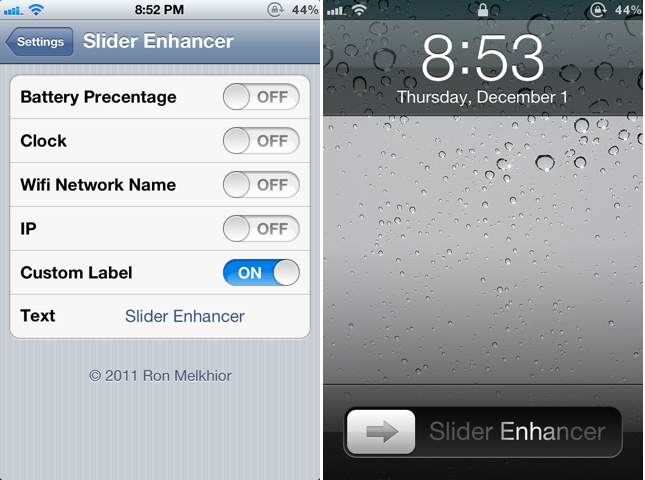
Are you sick of the native “Slide to Unlock” text on your iPhone’s Lockscreen? Do you want to replace it with custom text? Or with the Battery Percentage? A young Cydia tweaks developer, name Ron Melkhior, have released a tiny tweak in the cydia to sort out this problem. Slider Enhancer will let you to change the boring slide to unlock text. No new icons will added on your homescreen. However, you can customize the text in the settings. Under settings, there are five options. You can replace this text with Battery Percentage, Clock, Wifi network name, IP address or with Custom Label.
This tweak support iPhone or iPod Touch on iOS 4.0 or Higher. And the best part is that it is absolutely free of cost in Cydia Store. Well, there is an alternative of this tweak, Springtomize for iOS 4 or Springtomize 2 for iOS 5 but it will cost you $2.99 (You can probably find it for free on the xsellize repo). However, this tweak is absolutely free of cost.
Apple has responded officially to claims of collecting data via Carrier IQ, a diagnostics tools embedded in iOS 5 and previous versions of the mobile operating system, stating that any data sent back with the user’s consent did not include any personal information.
In a statement provided to the WSJ-owned All Things D blog, Apple said, “We stopped supporting CarrierIQ with iOS 5 in most of our products and will remove it completely in a future software update.”
“With any diagnostic data sent to Apple, customers must actively opt-in to share this information, and if they do, the data is sent in an anonymous and encrypted form and does not include any personal information. We never recorded keystrokes, messages or any other personal information for diagnostic data and have no plans to ever do so,” the Cupertino tech giant said.
Following this week’s reports about iOS containing an actual keylogging tool, U.S. Senator Al Franken promptly responded with a letter addressing Carrier IQ CEO, Michael Lenhart, claiming that all companies using the diagnostics tool may be in direct violation of federal law.
In the letter, Franken agreed that Carrier IQ’s tool may be beneficial in providing usage and diagnostic information to carriers.
He also too knowledge that “carriers can modify Carrier IQ’s software.”
“But it appears that Carrier IQ’s software captures a broad swath of extremely sensitive information from users that would appear to have nothing to do with diagnostics—including who they are calling, the contents of the texts they are receiving, the contents of their searches, and the websites they visit,” he wrote.
Franken believes these actions may violate the Electronic Communications Privacy Act and the Computer Fraud and Abuse Act, and maybe other federal privacy laws as well. “This is potentially a very serious matter,” he stressed.
Franken has demanded to have all his inquiries answered by December 14th, 2011.
ABI Research mobile device expert Michael Morgan agreed with Ars Technica testers in that Apple’s battery drain issue is related to software, not hardware, and that Cupertino needs to address the power management problem with a new firmware update.
What Morgan doesn’t say (but surely he’s thinking it) is that the company should roll out the fix pretty soon, as more and more complaints are piling up on the Apple Support Communities forums.
“iOS 5 may simply be using more data transmission or running more background processes to support its new features,” Morgan told Ars. “There is also some potential impact of iCloud services.”
He admits that Apple may be doing its best in trying to pinpoint the culprit, even though it appears the company is late in delivering the much needed patch.
“Any undefined glitch is a massive problem to solve for such a complex system,” Morgan explained.
It all has to do with how people use their phone individually, he said. There are so many variables to take into account that it could take weeks, even months before Apple’s software engineers zero in on the faulty code.
Morgan also acknowledges that Apple’s early attempts at squashing the bug caused other areas of the iOS to start draining the battery more rapidly: “iOS 5.0.1 supposedly fixed the problem for some users, but made it worse for others,” he said.
This falls in line with numerous Apple forum reports, as well as reports from our own readers. These people are actively discussing potential fixes in our comments, though few seem to be on the right track with their workarounds.
ABI’s analyst said his firm performed a teardown of the newly released iPhone 4S to try and eliminate hardware as a potential problem.
“We tore down the 4S and tested some of the major components, including the new A5 processor,” Morgan said. “Nothing that we tested was significantly different from the iPhone 4, and power draw was right where we expected it to be.”
So it appears iOS 5.1 is still the best bet for a potential fix. Unfortunately, developers testing the first beta have provided negative feedback as far as the battery issue is concerned.
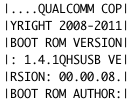
MuscleNerd has announced that the iPhone 4S baseband bootrom has been dumped.
iPhone4S baseband bootrom now dumped 🙂
For those of you who do not know what dumped means: to output (computer data), often in binary or hexadecimal form, esp. to diagnose a failure. The implication of this is that now we know what crashes an iPhone 4S baseband, so it will be much easier to exploit that failure and turn it into an entry point to inject the unlock 😀








 JoeSolutions