iOS code shows iChat references for iPhone, iPad


iOS developer @Gojohnnyboi discovered some code in iOS 5.0.1 that could indicate iChat — Apple’s Mac OS X instant messenger client — functionality may be coming to iPhone, iPad, and iPod touch down the road.

Although the new iMessage feature in iOS 5 doesn’t hook into the same chat services mentioned in the code, it would make a lot of sense for Apple to ultimately streamline the iChat, FaceTime, and iMessage into a single service across Apple devices.

How soon you’ll actually see this on your iPhone or iPad isn’t exactly clear, but this at least suggests Apple has been experimenting with this on the iOS platform.

Posted in iPad, iPhone | Tagged , , , | Leave a comment

iOS 5.0.2 Update Next Week To Fix Battery Issues, iOS 5.1 To Improve Siri


As reported by the popular German blog Macerkopf.de, Apple is going to release iOS 5.0.2 software update next week to finally fix battery woes. The battery issues started since the release of iOS 5 and iPhone 4S to the public. Many iPhone 4S users have reported fast battery discharge. iOS 5.0.1 should have fixed the issue but it actually hasn’t.

Apple was reportedly investigating the issues in iOS 5 and iOS 5.0.1 which caused battery problems. Apple now has been reported to be releasing iOS 5.0.2 by the end of the next week.

The technology blog also reported that Apple is currently working on iOS 5.1 to bring new Siri capabilities. In other words, iOS 5.1 will make Siri smarter.

The new iOS 5.1 update is also expected to bring Maps integration with Siri to additional countries. However, the report didn’t reveal the release date of iOS 5.1.

Posted in iPhone | Tagged , , , , , , , | Leave a comment

Steve Jobs Wanted to Build His Own Network Using Unlicensed Spectrum


Steve Jobs wanted to build his own wireless phone network with unlicensed spectrum used by Wi-Fi, according to a ComputerWorld report.

Chairman of venture capital firm Trilogy Partners, John Stanton, says he spent a fair amount of time with Jobs between 2005 and 2007.

“He wanted to replace carriers,” Stanton said of Jobs, the Apple founder and CEO who died Oct. 5 after a battle with cancer. “He and I spent a lot of time talking about whether synthetically you could create a carrier using Wi-Fi spectrum. That was part of his vision.”

Stanton says that after around 2007, Jobs gave up on the idea; however, he still managed to have a major impact on wireless operators.

“If I were a carrier, I’d be concerned about the dramatic shift in power that occurred,” he said.

Posted in iPhone | Tagged , , , , , | Leave a comment

Untethered iOS 5 Jailbreak Progress: Attacking Blob Monster


iPhone Dev Team member Musclenerd is keeping the iOS community posted on the progress of developing a full-fledged iOS 5 jailbreak solution with a new tweet that says they’re getting mixed results in trying to enable reverting to older firmware versions.

Musclenerd’s tweet is concise, but for those who know their way around iOS and jailbreaks, it should make a lot of sense.

The hacker says he’s burning the midnight oil alongside fellow hacker @0naj (and others) “to attack blob monster”. He adds: “mixed results so far (only for limera1n-able devices).”

The hacker links followers to the iPhone Dev Team’s post on this matter.

There, the team explained a while ago that Apple had started to aggressively combat “the ‘replay attacks’ that have until now allowed users to use iTunes to restore to previous firmware versions using saved SHSH blobs.”

“Starting with the iOS5 beta, the role of the ‘APTicket’ is changing,” the Team wrote, adding that “this will only affect restores starting at iOS 5 and onward, and Apple will be able to flip that switch off and on at will (by opening or closing the APTicket signing window for that firmware, like they do for the BBTicket).”

Remember what Musclenerd’s tweet said about limera1n?

Well, back when they made their blog entry on the blob monster, the hackers specifically said “Geohot’s limera1n exploit occurs before any of this new checking is done, so tethered jailbreaks will still always be possible for devices where limera1n applies.”

“Also, restoring to pre-5.0 firmwares with saved blobs will still be possible,” the Team added.

Well, at least we know things are progressing on the iOS 5 jailbreak front. The purpose is to not only to enable reverting to older firmware versions, but also to have an ‘untethered’ jailbreak.

Musclenerd also took the time to answer a question about upgrading to iOS 5.0.1 through OTA while jailbroken, saying “that’s possible in theory, but there are many more challenges that deserve attention before that convenience.”

Posted in iPad, iPhone, iPod | Tagged , , , , , | Leave a comment

Downgrade 5.0.1 to 4.3.3 / 4.3.5 for iPhone 4, 3GS, iPod Touch 4G, 3G, iPad


Want to downgrade 5.0.1 to 4.3.5 / 4.3.3 ? Well, in this post I will show you how to downgrade iOS 5.0.1 to 4.3.3 / 4.3.5 or to whichever version of iOS you are interested in for iPhone 4, 3GS, iPod touch 4G, 3G and iPad.


Downgrade 5.0.1 to 4.3.3 / 4.3.5 – Requirement :

Before we show you how to downgrade 5.0.1 to 4.3.3 / 4.3.5 or any iOS version please keep in mind that you can only downgrade your iOS version only if you have saved your SHSH blobs (for the older iOS version) using either Cydia or TinyUmbrella (or even the “copy from /tmp during restore” method for advanced users).

iPhone 4S downgrade still not available as it can’t be jailbroken so far.

How to downgrade 5.0.1 to 4.3.3 / 4.3.5 – iPhone 4, 3GS, iPod Touch 4G, 3G, iPad:

Step 1: Make sure that you have downloaded the version of iOS which you gonna downgrade to (4.3.5, 4.3.3 or any iOS version)

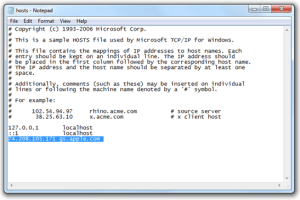
Step 2: Navigate to :
Windows Users: Windows > System 32 > drivers > etc
Mac Users : etc

Open hosts file with the text editor then add the following code to the end of the file :

74.208.105.171 gs.apple.com

Alternatively: Use TinyUmbrella to make iTunes look at Cydia’s Server in the Advanced options.

Step 3: Plug your iOS device and switch it off

Step 4: Put your iOS device in DFU mode (Use redsn0w 0.9.9b8 for this, go to extras then Pwned DFU)

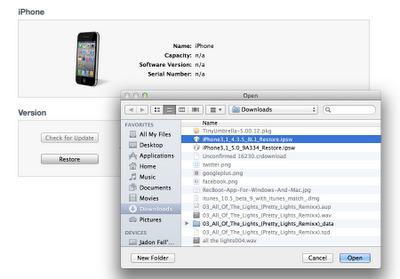
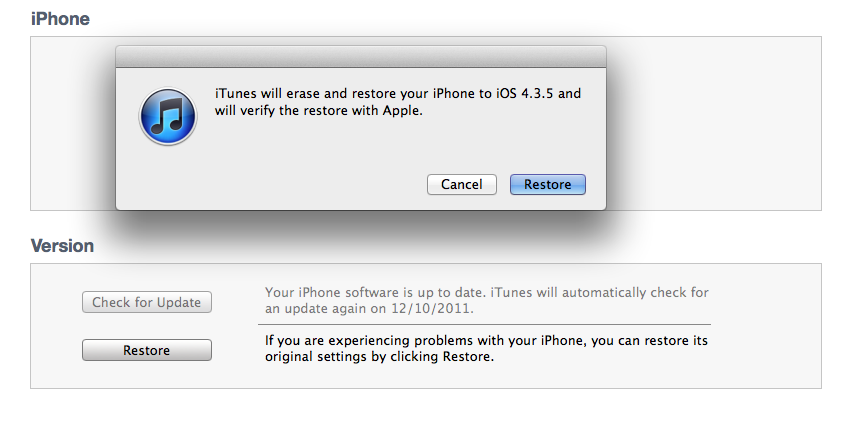
Step 5: Select the firmware you gonna downgrade to manually to restore your deice. (Shift on Windows, and option on a Mac)

iTunes will tell you that it is verifying with Apple servers but actually it will verify with Cydia servers.

Step 6: You may receive 10xx error, but don’t worry, this is normal and has a quick fix – Click Here to fix such errors.

Now you have successfully downgrade iOS 5.0.1 to 4.3.3 / 4.3.5 , but in case you found any problems doing this, please let us know in the comment section.

Posted in iPad, iPhone, iPod | Tagged , , , , , , , , , | Leave a comment

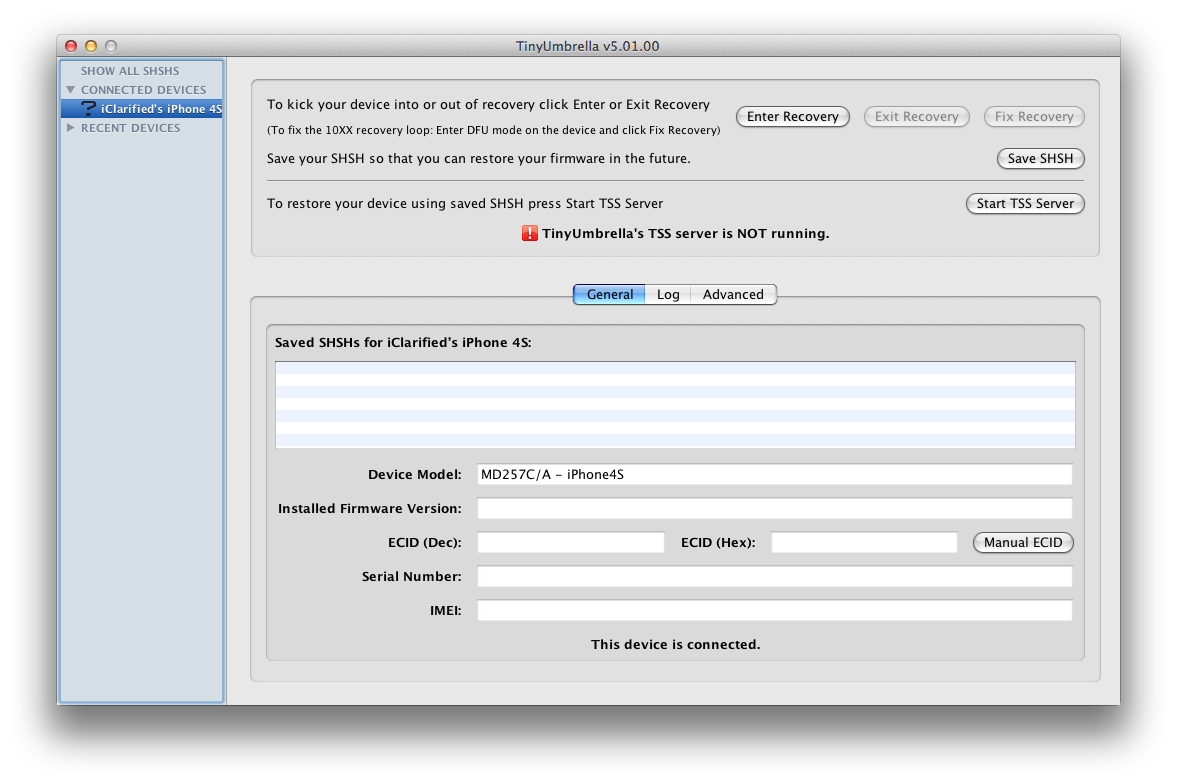
TinyUmbrella is Updated for iOS 5.0.1 With Tentative iPhone 4S Support


Semaphore has updated TinyUmbrella, an app that saves your SHSH blobs, with support for iOS 5.0.1 and tentative support for the iPhone 4S.

Even though there is still no working solution for restoring 5.x on iPhone 4S I have released a 5.01.00 so you can at least save 5.0.1 SHSH. I have added tentative support for at least saving 5.0.1 SHSHs for iPhone 4S but as of now we are unable to use them fully. As soon as more information is available I will update.

It may be a good idea to save your SHSH blobs using the tutorials below. We’ll update you with more information as soon as it becomes available.
● Mac Tutorial
● Windows Tutorial

Posted in iPad, iPhone, iPod | Tagged , , , , , , , , | Leave a comment

Siri Ported On Android, Mac, iPhone 4, iPad 2!


You read it right, folks! You’ll be able to soon to run Siri on any device you just wish. Applidium, a French engineering firm, has managed to crack Siri’s security protocol that made Siri limited to the iPhone 4S. In other words, you’ll be able to run Siri on any device including Android, Mac and Windows.

This also includes any model of the iPhone, iPod touch and iPad. Siri is now not limited to the iPhone 4S, it can run on any iOS device and even on non-iOS devices.

What’s more amazing? Well, the awesome thing about this is that developers can now integrate Siri inside their apps too.

The iPhone 4S really sends raw audio data. It’s compressed using the Speex audio codec, which makes sense as it’s a codec specifically tailored for VoIP.The iPhone 4S sends identifiers everywhere. So if you want to use Siri on another device, you still need the identfier of at least one iPhone 4S. Of course we’re not publishing ours, but it’s very easy to retrieve one using the tools we’ve written. Of course Apple could blacklist an identifier, but as long as you’re keeping it for personal use, that should be alright!

The developers also found that Apple uses a lot of information when it communicates with its servers when it comes to Siri:

The protocol is actually very, very chatty. Your iPhone sends a tons of things to Apple’s servers. And those servers reply an incredible amount of informations. For example, when you’re using text-to-speech, Apple’s server even reply a confidence score and the timestamp of each word.

There’s only one bad thing; you’ll need a UDID of an iPhone 4S to get this cracking working on your device so at any time Apple could block the UDID you used. This means that Apple could push a fix once it’s released, another cat and mouse game!

Siri was successfully ported to the iPhone 4 and iPod touch couple of weeks back. It has been also connected to Apple’s servers successfully.

Posted in Uncategorized | Tagged , , , , , , , , , | Leave a comment

iTunes 10.5.1 Download Available To The Public!


Apple has just released iTunes 10.5.1 to the public and download available no more beta versions, and as Apple released iTunes 10.5.1 it also released iTunes match with it The new iTunes is also available on Apple’s website, and the 10.5.1 is propagating in Software Update for Mac and Windows users. iTunes 10.5.1 is required to use iTunes Match, and iOS 5 users will be able to access their tracks in the cloud once the service is enabled in iTunes.

iTunes match isn’t yet available for all users and it is still for US services…Watch out more screenshots after the jump:

As shown in the picture above, iTunes Match is available for $24.99, enjoy all

Posted in Uncategorized | Tagged , , | Leave a comment

Bugs Continue To Haunt iOS 5.0.1 Users


iOS 5.0.1 was released to solve the battery issues that iPhone 4S owners were experiencing. But Apple released a statement which said that there are still investigating a few remaining issues with the new version. Now many users are discovering a new host of bugs on iOS 5.01.

According to GigoOm, apart from poor battery issues that the users are experiencing on iOS 5.0.1, users are also experiencing WiFi drop-outs, microphone problems and a weird bug in contact recognition on the Verizon iPhone 4S.

There are numerous pages of bug complaints about bugs in iOS 5.0.1, with iOS 5.0.1 not solving most of the problems. Apple didn’t clearly mention that which issues are still not resolved after releasing the new version so one can’t expect the bugs and glitches to be fixed any time sooner.

On the Verizon iPhone 4S , TheStartupFoundry discovered a new bug in which performing an OTA update to iOS 5.0.1 makes the phone’s contacts to become unrecognized. Apart from that users won’t be able to downgrade from iOS 5 versions. So those on 5.0.1 are now trapped.

If you’ve updated to iOS 5.0.1, have you found any bugs? How is the battery life of your iPhone? We would like to hear your comments below.

Posted in iPad, iPhone, iPod | Tagged , , | Leave a comment

Adobe: Steve Jobs Was Right, HTML5 Is Better for Mobile Web


To all you Steve Jobs haters, Voila…:

Adobe officials are becoming vocal on the discontinuation of Flash for mobile platforms with one lead developer admitting that it was all Apple’s fault. He also admits that HTML5 is proving to be the right choice for mobile web.

Mike Chambers, lead product manager for Flash, has made a blog entry which reveals that Apple is responsible for the decline of mobile Flash, or at least that the Cupertino giant kick-started the chain of events that led to its discontinuation.

“This one should be pretty apparent,” he wrote on his blog, “but given the fragmentation of the mobile market, and the fact that one of the leading mobile platforms (Apple’s iOS) was not going to allow the Flash Player in the browser, the Flash Player was not on track to reach anywhere near the ubiquity of the Flash Player on desktops…”

“Just to be very clear on this. No matter what we did, the Flash Player was not going to be available on Apple’s iOS anytime in the foreseeable future,” he said.
Chambers also tells followers that Adobe’s decision was not an easy one.

However, like any company out there, they have to prioritize resources, and throwing money at mobile Flash was no longer feasible, he says:

“Considering how politically charged the issue has been, the decision to stop development of the Flash Player for Mobile Browsers was not an easy decision,” he writes “However, at the end of the day, there were a number of items that made it clear that putting resources towards its continued development would not be the best use of resources.”

Chambers downright admits Adobe’s defeat in the face of HTML5, the web standard promoted by Steve Jobs in his open letter titled “Thoughts on Flash”.

“On mobile devices HTML5 provides a similar level of ubiquity that the Flash Player provides on the desktop. It is the best technology for creating and deploying rich content to the browser across mobile platforms,” he says.

Steve Jobs’ material single-handedly killed Flash on mobile, but it took over a year and a half see the ‘fruits’ of his labor.

Posted in iPad, iPhone, iPod | Tagged , , , , , , | Leave a comment