iPhone 4S Facing Audio Issues


Apple’s iPhones, while being market leaders, constantly seem to be infested with one problem or the another. After users found a battery drain bug problem with the new 4S, another problem came to light with the beta version of iOS 5.0 firmware.

The firmware and the phone seem to have audio issues during calls that have not been resolved in the latest iOS 5.0.1. The audio is found to be sketchy and the calls seem to drop half- way through the conversations. The Apple forum threads have multiple complaints regarding these issues.

Many users complain that the headset starts giving out an annoying and crackly echo sound during calls which gets louder and more unbearable unless the headset is plugged out and then plugged in again. Call dropping is a more frequent problem with the new 4S as the calls seem to continue on the call timer while there is no audio to be heard.

We will keep you up- to- date and posted with the solutions to these problems as soon as Apple announces anything.

Posted in iPhone | Tagged , , , | Leave a comment

Recover Lost Data on iPhone and iPod Touch using iPhone Backup Extractor


Today we have something very amazing for every iPhone and iPod Touch owner. Dubbed iPhone, iPod Touch back extractor, this utility will let you to recover iOS backups in iTunes on your Mac. But if your iTunes data is encrypted and you are not using OS X lion then you are left in the cold. This app will also work with Leopard (Intel), Snow Leopard, Lion and on any iPhone or iPod Touch running iOS 5 or lower versions.

The best thing about this utility is that it is absolutely free of cost and it is very light as well. You can download it from Developer’s website. This utility will let you to extract backup in iTunes for any individual app and you can restore it using Phoneview. The best part about this app is that you can even get your Photos and Videos from Camera roll back.

How to use this application?

Go to the developer’s website and download your copy, Don’t forget to donate.
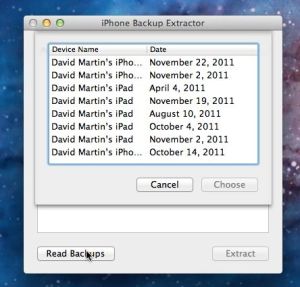
After downloading, copy this in ‘Applications’ folder, Launch this application. A window will be opened, Click on Read Backup and a list of all the backups present in iTunes will be shown.

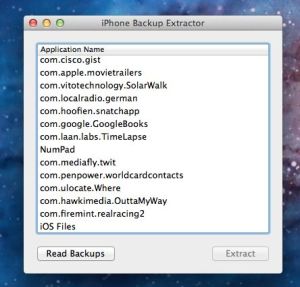
Select the backup from this list, and hit the Choose button. A new list will be opened showing all the backup data for each app.

You will also find something really amazing here, iOS Files, this has all the Photos and videos from your iPhone.

For Lion users, you should use FileVault 2 to encrypt the User Accounts Library folder. And you don’t need to use the encryption provided by the iTunes.

Posted in iPhone, iPod | Tagged , , | Leave a comment

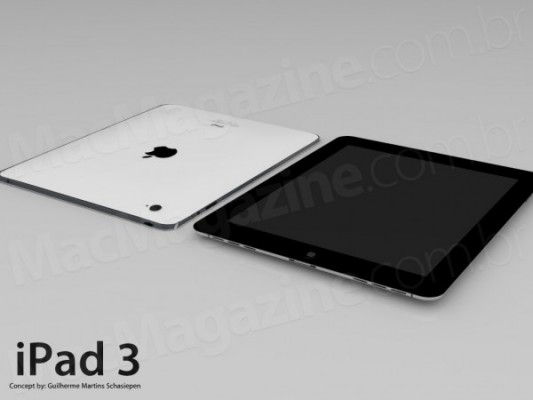
A Hidden Code In iOS 5 Shows Interesting iPad 3 References!


Since Apple released iOS 5 and the developers are digging into iOS 5 codes spotting some hidden features, today the guys at 9to5Mac spotted a hidden code in iOS 5 show’s some interesting iPad 3 references The site has exposed several secret features in the new software by code-digging over the last few months — including Siri.

As we reported for you from some time that Apple stopped working iPad 2 display orders and preparing for iPad 3 launch, also we told you that iPad 3 expected to be have a higher resolution display and be more thinner…
Its recent find pertains to an unreleased Apple product, codenamed J2. The site believes that this could actually be the next version of the iPad. Not only that, but it thinks that this could be the Retina display-equipped tablet everyone has been talking about…Apparently, the J2 codename matches up with a recent report from Digitimes, which also names a J2 device as Apple’s next tablet.

“Since Apple demands that the new iPad model will need to be thinner than the iPad 2, while raising the machine’s screen resolution to 2048 by 1536, upstream component makers have been working aggressively to adjust the device’s LED and panel module designs to satisfy these demands, but the work has affected the launch schedule fo the new tablet PC. Apple is currently giving two tablet PC projects codenamed J1 and J2 to its upstream partners for development. The sources revealed that the major differences of the new tablet PCs compared to the previous model are their size, specifications and technologies.”

The report said Apple is yet to choose between the J1 and J2 model, but it seems like the J2 is actually just the 3G model (the J2 reference was found alongside other CDMA iOS devices) and it is possible that there is a J1, but that has not been found in the iOS 5 code.

Posted in iPad | Tagged , , , , , | Leave a comment

iOS 5.0.2 Delayed


Last week, a report from a popular German website spread on the web reporting that iOS 5.0.2 would have been released last weekend. The weekend is now over and we didn’t see iOS 5.0.2 so we’re seeing reports about delays.

AppleInsider today reported that iOS 5.0.2 has memory leak issues that Apple needs to fix before the release so it might have been delayed.

The report says that iOS 5.0.2 new date is not set yet and it will finally fix battery woes for iPhone 4S users:

The rumored iOS 5.0.2 update is said to provide iPhone 4S users with 10 hours of active use. Apple’s official technical specifications advertise 200 hours of standby time, up to 8 hours of 3G talk time, 6 hours of 3G Internet use, 10 hours of video playback, or 40 hours of audio playback.

However, if you are looking forward for an untethered jailbreak for your device, we recommend that you stay on iOS 5 since there’s a bug allowing finding more exploits easily.

Posted in iPad, iPhone, iPod | Tagged , , , , , , , | Leave a comment

How to Enable Native iTunes ”Now-Playing” Notification on Mac OS


Here is a simple tutorial will help you enable the Now Playing Pop-up in your dock. There is a hidden settings in your dock by which you can Enable or disable this notification.

How to Enable:

To enable this pop-up follow the following steps:

The very first step is to quit the iTunes application then go to applications and then Utilities; Launch the Terminal application from there.

Enter the following command in Terminal (you can copy paste it):

defaults write com.apple.dock itunes-notifications -bool TRUE;killall Dock

Start the iTunes and play any track, you will notice a pop-up in your Dock, showing which track is playing. But iTunes icon might be disappeared, however to get back this icon, Enter the following command;

defaults write com.apple.dock notification-always-show-image -bool TRUE;killall Dock

How to Disable:

To disable this pop up, open terminal window and Enter the following commands;

defaults delete com.apple.dock itunes-notificationsdefaults delete com.apple.dock notification-always-show-image;killall Dock

In this way, you can enable Now-Playing Pop-up on your Dock on Mac OS!

Posted in iPad, iPhone, iPod | Tagged , , , , , , , | Leave a comment

What’s The Difference Between User,Hacker, And Developer Filters In Cydia


If you’ve ever wondered what is the difference between the three different filters that cydia asks you to choose upon launching it for the first time, here’s your answer!

And of course most of us choose user which brings apps, jailbreak tweaks and finally themes, while Hacker adds command line tools with a coding methods and some other things which belongs to hackers, while a developer get’s more packages and another scary world….Of course Cydia don’t offer all packages to the user, let us check out the video which make you understand the difference….

Posted in iPad, iPhone, iPod | Tagged , , , | Leave a comment

iPhone Beats BlackBerry in Business


Wow, the iPhone has beaten Blackberry at its own game! This is what Forbes reports:

Apple’s iPhone has surpassed BlackBerry among business users for the first time, underscoring the company’s successful push into the corporate world.

Commercial Wi-Fi provider iPass polled more than 2,000 employees at over 1,000 enterprises last month, revealing Apple represents nearly nearly half of corporate mobile use, while Research in Motion’s device has sunk to slightly over one-third.

The shift is due more to the rise in popularity of competing smartphones, rather than the decline of the BlackBerry, according to iPass.

Apple has been making a play for enterprise for some time,unveiling an App Store designed for business users this summer and poaching several former RIM employees last year to strengthen its push into the corporate market.

This spring, Deutche Bank, J.P. Morgan and other financial institutions launched pilot programs allowing iPhones at work, indicating the Cupertino, Calif.-based company’s gains in the enterprise sector and highlighting faith in the device’s security and business features.

But, the iPass survey is the first to measure iPhone’s popularity across varied industries and company sizes to reveal its newly minted overall enterprise dominance.

“While increasing iPhone usage in the workplace was inevitable, this is the tipping point when the iPhone has overcome the BlackBerry on its traditional enterprise turf, and business smartphones are in the hands of nearly every knowledge worker,” said iPass president and CEO Evan Kaplan.

More than 90 percent of workers use smartphones on the job, a huge jump since BlackBerry first introduced the concept of mobile messaging for business communication. Companies also allow employees more choice in devices these days, creating “bring your own device” policies. As a result, nearly half of all workers mix business and pleasure on a single handset, which is increasing not produced by RIM.

With the iPhone rising steadily in customer satisfaction and RIM bowing under widespread outages and financial problems, many employees and employers are using that newfound choice to migrate to the iPhone.

Other competing devices are gaining in enterprise use as well, such as Android smartphones, which run a close third behind iPhone and BlackBerry according to iPass. RIM may soon find itself falling off the bottom of the field as iPhone and Android take a place in the business sector the company once held so strongly.

Posted in iPhone | Tagged , , , , , | Leave a comment

Patent Reveals Apple’s Work On Crack Resistant Glass For Devices


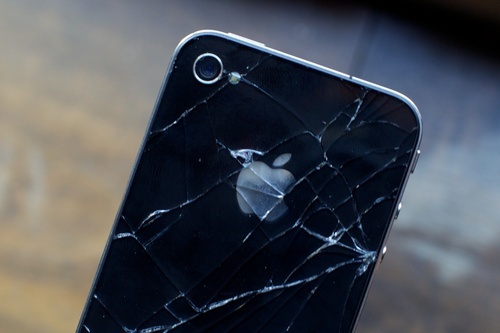
Apple made both the iPhone 4 and iPhone 4S to be soft and the handset’s design also has one major downfall — its front and back glass panels. Its nearly all-glass outer casing has made the iPhone noticeably more fragile and susceptible to damages than other smartphones.

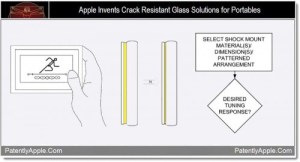
Apple is looking into fixing this problem in future devices, so that patent Apple has revealed was very interesting. This particular filing describes a method of creating crack resistant glass solutions for portable devices. The document covers multiple ways of doing this, but there are two that really stand out.

The photo above shows that the method involves disposing a tunable shock mount between the cover glass and the main body. This would dampen the blow of a drop because it isolates the glass from the rest of the device. It would also help protect against water damage. So we are sure that we are going to see a lot of good things from Apple soon.

Posted in iPad, iPhone, iPod | Tagged , , , , | Leave a comment

Apple Cancels iPad 2 Display Orders, Preparing For iPad 3 Launch!


From some time ago Apple was working on iPad 2 Display orders in order to make iPad 2 with a nice retina display, but according to a report from DigiTimes which claims that Apple has just canceled iPad 2 display orders and preparing for iPad 3 launch early 2012…

The report says that Apple has officially canceled it’s fourth quarter iPad 2 display panels orders, as Apple has already about an extra 4-5 million iPad 2 in the third quarter so that Apple saw that it must reduce the orders and work on iPad 3 which some sources says it will be released early 2012…

Sales of iPads at the end market totaled 11.12 million units in the third quarter of 2011, according to data released by Apple. However, inventories of parts and components prepared by the makers in the supply chain for the production of iPad 2 in the quarter are sufficient for the production of 15-16 million iPads, leaving a stockpile of 4-5 million units of iPad 2 in the supply chain, the sources noted.

iPad 3 expected to be released early 2012, report says:

While Apple is adjusting panel inventory for iPad 2, Samsung and Sharp already began shipping panels for the next-generation iPads to Apple in October, and Taiwan-based touch panel makers TPK Holding and Wintek will begin to ship touch panels for the new iPads to the supply chain in November-December, the sources noted.

Posted in iPad | Tagged , , , | Leave a comment

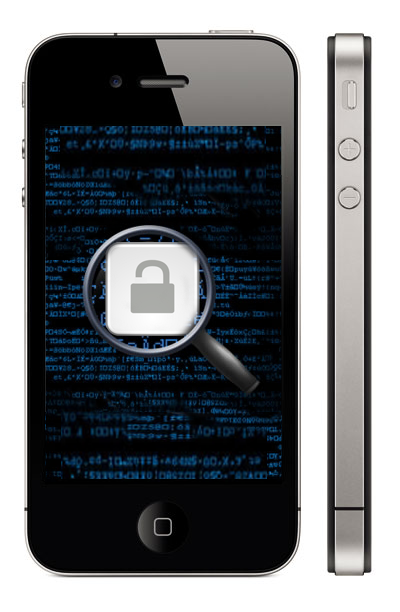
HUGE: How to unlock iPhone 4S, 4, 3GS Without Jailbreak or Gevey SIM


How to unlock iPhone 4S, 4, 3GS without Jailbreak (ultrasn0w) or Gevey SIM? Well, here’s a new trick has been discovered by developer called Michael Capozzi, this trick allows users to unlock iPhone 4S, iPhone 4, iPhone 3GS without jailbreak and without Gevey SIM.

Note: Only AT&T iPhones can be unlocked with this trick.

How to Unlock iPhone 4S, 4, 3GS without Jailbreak or Gevey SIM

Step 1: Insert original carrier AT&T SIM card
Step 2: Dial 611 for AT&T customer service hotline and drop the call
Step 3: Turn on Airplane Mode
Step 4: Take out AT&T SIM card
Step 5: Insert T-Mobile SIM card
Step 6: Make sure WiFi is off ( also tap on ‘Forget this Network” to make sure it doesn’t connect automatically later)
Step 7: Switch off Airplane Mode and iPhone will search for network. This is followed by the Apple splash screen appearing.
Step 8: Activation Required will be displayed on the screen
Step 9: EDGE network will activate automatically – notice the ‘E’ on the top left corner of the screen
Step 10: Wait for about 20-30 seconds and turn off the phone
Step 11: Turn on iPhone and the same Activation Required screen will be displayed
Step 12: When you see one signal bar, tap on Use Cellular Connection
Step 13: Eject SIM card
Step 14: Activation Required screen will be displayed the second time
Step 15: Insert SIM card – Unlocked!

How to unlock iPhone 4S, 4, 3GS [Video]


Actually we didn’t tried this tutorial ourselves so far, but we will update you with results immediately once we finished it.

Posted in iPhone | Tagged , , , , , , | Leave a comment