Untethered 4.3.5 by i0nic?


After Apple pushed iOS 5, the Chronic Dev team and iPhone Dev team said that they will be shifting their efforts towards finding an untethered solution for iOS 5 instead of iOS 4.3.4 or 4.3.5. In a shocking move today we learn of the possibility that iOS hacker and security expert i0nic may be on the verge of releasing an untethered jailbreak for iOS 4.3.5

For who don’t know i0n1c, he’s the hacker who discovered the untether exploit for iOS 4.3.1 which has been implemented by iPhone Dev-team with Redsn0w to bring stable untethered jailbreak on 4.3.1 for iPhone 4, 3GS, iPod touch 4G, 3G and iPad 1.

On his Twitter account, he asked his followers to release 4.3.5 untethered jailbreak or it’s not valuable ? Despite they replied him “Don’t release it”, he decided to release it saying “I will do an iOS 4.3.5 untether” .

Why i0nis has chosen to do this remains a mystery. It seems that only time will tell.

Posted in iPad, iPhone, iPod | Tagged , , , , | Leave a comment

iOS 5 Apps “Cleaning” Themselves?


Just after Apple released iOS 5 it added a lot good features that users needed, but by passing days users began asking about the “Cleaning” which appears in the icon apps on your iPhone homescreen, we all used to see “Waiting” or “Installing” but we haven’t seen before “Cleaning” so what does icon app “Cleaning” mean?

And really this thing has been noticed in Facebook app and Twitter app too, well after Apple released iOS 5 it added some new features to it, one of them was the “Cleaning” feature this feature will automatically delete temporary files and data stored in the cache.

And really this is a good one from Apple, because iPhone users in a need for some free spaces in their device,so this feature removes the useless files…Thanks Apple..

Posted in iPad, iPhone, iPod | Tagged , , , | Leave a comment

How to Recalibrate Your iPhone’s Unresponsive Home Button


Here’s a nifty trick to recalibrate your iPhone’s home button if you’re finding it little unresponsive or laggy. You don’t need to take it apart for it.

All you need to do is follow these simple instructions:

1. Launch any app such as Stocks, Weather etc that comes pre-installed with your iPhone.

2. Press and hold the power button until you “slide to power off” appears on the screen.

3. Release the power button and now press and hold the Home button until the “slide to power off” goes away.

That’s it. You will notice that it kills the app. You will also notice that the home button is a lot more responsive.

We didn’t know that there was a way to recalibrate the home button. Kudos to Jeff Benjamin of iDB for the tip!

Interestingly, this tip can also be used if you want to force kill an app or clear resource used by an app (we’re not sure what’s the significance of using a pre-installed app).

Posted in iPad, iPhone, iPod | Tagged , , , , , , | Leave a comment

pod2g Hands Over the A4 Jailbreak to Chronic Dev-Team to Focus on A5 Devices


Pod2g has announced that he’s handed over the A4 to the Chronic Dev-Team and is focusing all his energy on completing the A5 (iPhone 4S, iPad 2) jailbreak.

I read the comments on the blog, and I know that a lot of people are waiting for the A5 jailbreak. Also, I know there are tons of people out there with A4 or even earlier devices who wants the untether now and don’t care about it could be interesting to wait A5 is finished to release or even 5.1, so that we don’t waste an exploit that took me months to find and develop.

I need to focus on A5 and hope I can find a path quick, and I have the feeling that chronic-dev could help me. So, here is what I did:
● I gave all the details to the chronic dev team so that they can finish, test, integrate and release the A4 jb ASAP.
● I’ll put all my energy from now on on the A5

For those waiting for an untethered jailbreak on the iPhone 4, iPhone 3GS, iPod Touch 4G, iPod Touch 3G, and iPad 1, it means you’ll see a release sooner than later

Posted in iPad, iPhone, iPod | Tagged , , , , , | Leave a comment

Download Redsn0w 0.9.9b9d To Fix Issues With iPhone 3GS (Old BootROM) 5.0.1 Untethered Jailbreak


A couple of days ago, Redsn0w 0.9.9b9 has been released to jailbreak iOS 5.0.1 for iPhone 4 and iPhone 3GS users and of course this version is a tethered one, but today some iPhone 3GS was facing a lot of problems during jailbreaking, so that the Dev Team was quick at fixing a bug that affected iPhone 3GS owners with older bootrom. This fix comes with RedSn0w 0.9.9b9d which was released earlier today.

So all iPhone 3GS users with older bootroms  will have to use this Redsn0w 0.9.9b9d which will fix the issues, you can read Dev Team release note:

iPhone3GS owners in our comments section below noticed a problem with the untethered jailbreak available for the old-bootrom 3GS. We’ve corrected that problem in 0.9.9b9d. If you have an old-bootrom 3GS and have already used last night’s redsn0w on it, you can re-run it again without losing anything. Just use this new version, go to Extras->IPSW and manually select the 5.0.1 IPSW, then go back and Jailbreak it again (but you can uncheck Cydia because it’s already installed).

Here are the download links 😀

Download Redsn0w 0.9.9b9d [Mac users]
Download Redsn0w 0.9.9b9d [Windows users]

Posted in iPhone | Tagged , , , , , , , , | Leave a comment

Unlock iPhone 4 / 3GS on 5.0.1 with Ultrasn0w 1.2.5


How to jailbreak and unlock iPhone 4 / 3GS on 5.0.1 with Ultrasn0w 1.2.5 and Redsn0w 0.9.9 b9d ? Well, couple of days ago we reported you that iPhone Dev-team will release ultrasnOw 1.2.5 to unlock iPhone 4 and iPhone 3GS on iOS 5.0.1 by Monday, but it looks we have early release for ultrasn0w 1.2.5.

As we told you earlier that ultrasn0w 1.2.5 is only minor update to unlock the already unlockable basebands on iOS 5.0.1 for iPhone 4 and iPhone 3GS.

Ultrasn0w 1.2.5 support the below basebands :

  • 01.59.00
  • 04.26.08
  • 05.11.07
  • 05.12.01
  • 05.13.04
  • 06.15.00

Don’t know your iPhone’s baseband version ? Go to Settings > General > About > Modem Firmware

Required Downloads:

To unlock iPhone 4, 3GS with ultrasnOw 1.2.5 on iOS 5.0.1 you have to know that :

You MUST jailbreak your iPhone 4 or iPhone 3GS with Redsn0w or sn0wbreeze using custom ipsw firmware to preserve your old basebands to be able to unlock your iPhone with ultrasn0w 1.2.5. If you are using Gevey SIM you can follow this guide.

How to Unlock iPhone 4, 3G 5.0.1 with Ultrasn0w 1.2.5 [Tutorial]

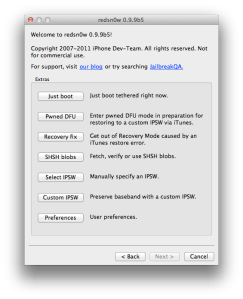
Step 1: Connect your iDevice with your PC via USB and open Redns0w you just downloaded above.

Step 2: Start Redsn0w, press on “Extras” > “Custom IPSW” and then point Redns0w to iOS 5.0.1 ipsw firmware that you downloaded above.


Now Redsn0w will start cooking your custom iOS 5 ipsw firmware

Step 3: Click on “Pwned DFU”

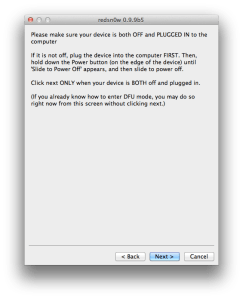
Step 4: Now make sure your device is both OFF and PLUGGED IN to the computer before you click “Next”.

At this stage you will be presented with a screen where you will be guided on how to enter DFU mode. Quickly hold “Power” button and then while holding the “Power” button, you will now have to hold “Home” button too. Now after few seconds release “Power” button but keep holding “Home” button until installation begins.

Step 5: Open iTunes then restore your iPhone 4, 3GS to the Custom iOS 5.0.1 ipsw (the file name begins with NO_BB).

Step 6: Now Open Cydia > Manage > Sources > Edit > Add then type the following repo :

http://repo666.ultrasn0w.com

Step 7: After installing this repo, tap on search and search for ultrasnOw then install it.

Congratulations, now you have unlocked iPhone 4, 3GS on 5.0.1 using ultrasn0w 1.2.5.

Posted in iPhone | Tagged , , , , , , , , , | Leave a comment

More and More Excellent News From pod2g!!


Now we have got excellent news that  iOS 5.0.1 / 5.0 untethered jailbreak demoed in a video by the  iPhone hacker Pod2G, He has sent  you tube video link showing  iOS 5.0.1 / 5.0 untethered jailbreak in action on iPhone 4

Here’s what Pod2g said:

Hello,

 Here is a new video demo of the current status of the 5.0.1 jailbreak running on an iPhone 4.
 This is meant to reassure people that were thinking it only works on older iPods.
 The jailbreak is near ready for prime time (excluding 4S and iPad 2).
 Patches are the same as redsn0w’s. Expect the same level of stability.
 Some more days to wait. Be patient, we’re doing our best.
 ~pod2g


You’ve to watch this!

Posted in iPad, iPhone, iPod | Tagged , , , , , , | Leave a comment

pod2g Resolves Cache Troubles With the iPhone 4S Untethered Jailbreak


Yesterday, we told you that pod2g discovered that his untethered jailbreak failed on the iPhone 4S because of multicore cache management. Today, we learn that he has resolved the cache troubles with the iPhone 4S untethered jailbreak, according to a new progress update.


OK, figured it out, the A5 cache is not a problem anymore. I sorted it out by doing the untether in a single thread and by flushing all the dcache then all the icache in a row at a strategical point of the process. It took me like a hundred of tests to find the key. Hard for the nerves.

For the tech guys, here is a link explaining issues related to self modifying code ( or code patching ) on the ARM platform : http://blogs.arm.com/software-enablemen … ying-code/

Another news : I discussed with @saurik today about the launchd boot process, and he’s found one missing piece of the puzzle I needed to have a perfectly stable jailbreak. He’s definitly one of the best iOS gurus out there. Thank you saurik!

Posted in iPhone | Tagged , , , | Leave a comment

iPhone 4S UNTETHERED JAILBREAK ALMOST HERE!!!


iOS hacker known as pod2g has recently update his blog with the progress about the iPhone 4S jailbreak. Since everyone donated money to him to get his hands on the 4S, they’re now waiting to hear good news from the hacker. Pod2g has already purchased the iPhone 4S and started working on it two days ago. Details below!

iPhone 4S Untethered Jailbreak

Pod2g couple of hours ago wrote a blog post regarding the status of iPhone 4S untethered jailbreak. The hacker, pod2g, is currently facing some issues with untethering the iPhone 4S. That is due to “processor cache issues” related to multicore cache management.

Howoever, pod2g thinks that he is close to solve the problem. He says that he’ll report the progress tomorrow.

Here are the news of the 4S week-end.

The untether fails right now because I’m having processor cache issues.

I’m close, but I can’t figure out what happens. It certainly has something to do with the multicore cache management.

I could sort it out quick, it’s a matter of chance.

We still don’t know what kind of exploits did pod2g discovered but it looks like that his jailbreak is a userland jailbreak as I heard that he’ll update Comex’s JailbreakMe.

If it’s userland jailbreak so there’s a very high chance it will work on the A5 devices as the iPhone 4S and iPad 2. This also means that it might easily patched by Apple in a new software update.

Posted in iPhone | Tagged , , , , | Leave a comment

Ultrasn0w 1.2.5 for iPhone 4, 3GS to Unlock 5.0.1 Coming Next Monday


Ultrasn0w 1.2.5 for iPhone 4, 3GS to Unlock 5.0.1 coming within few days. Earlier today we reported you about the new release of Redsn0w 0.9.9 b9b that jailbreaks iPhone, iPod touch and iPad. iPhone Dev-team has announced today in his official blog that ultrasn0w will be available on Cydia to unlock iPhone 4, 3GS on 5.0.1.

From Dev-team blog :

ultrasn0w compatibility update (i.e. same baseband requirements) for 5.0.1 will be available on Cydia Monday

Ultrasn0w 1.2.5 is not a new unlock for higher basebands, ultrasnOw 1.2.5 will bring compatibility with iOS 5.0.1 to unlock the already unlockable basebands. So what are the supported basebands ?

Supported Baasebands for ultrasn0w 1.2.5 unlock on iOS 5.0.1

  • 01.59.00
  • 04.26.08
  • 05.11.07
  • 05.12.01
  • 05.13.04
  • 06.15.00

Ultrasn0w 1.2.5 will be released by the next Monday, you will be able to use ultrasn0w 1.2.5 after jailbreaking your iPhone 4, 3GS via custom firmware using Redsn0w 0.9.9 b9b. But we highly recommend iPhone 4, 3GS users to don’t update to iOS 5.0.1 until the release of ultrasn0w 1.2.5 officially, stay tuned

Posted in iPhone | Tagged , , , , , | 2 Comments