3G iPod Touch Image Appears On Official Apple’s Site


The hour before the iPhone 4S was announced, we’ve seen the iPhone 4S image & Spring logo on Apple’s official website and that was real, it happened: Apple’s iPhone 4S launched on Sprint. Now we see another rumored device appears on Apple’s servers.

3G iPod Touch

On Apple’s store images server, a 3G capable iPod touch has been unveiled. The image on Apple’s official website (can be seen here) contains a 3G iPod touch along with something we can’t identify. We’ve cropped the image to show the 3G iPod touch only.

The rumor of a 3G iPod touch was there few months ago and it was expected to be announced during Apple’s last event, Let’s Talk iPhone. We haven’t seen it yet but this image above confirms that we’ll get it sooner or later. May be during WWDC 2012?

Posted in iPod | Tagged , , , | Leave a comment

So… What Happened To The iPhone 5?


Since CNET posted the iPhone 5 story this weekend…

 …the iPhone 5 is a “complete redesign. This is a very large project that Steve dedicated all of his time to. He was not that involved in the 4S because his time was limited.”

…we thought it would be a good time to tell you what our sources think happened to the iPhone 5 that some were expecting. We’ve heard from Foxconn managers as well as Apple employees and carrier partners on this and have tried to piece together the full story.

The iPhone 4S as you see it was originally planned to be released at WWDC with iOS 5, like every iPhone before it.

But something happened around February of this year that threw everything off. Apple was still integrating the Siri team and code into iOS and it was going much slower than planned. In February, Apple knew they weren’t going to be able to get an iOS 5 Beta to developers in April and they sure weren’t going to have a stable version by WWDC. They would be lucky to get a final version of Siri into customers’ hands by the holiday shopping season (Siri is currently in Beta in three languages).

At the same time, Apple’s iPhone 5 (teardrop) plans were moving along on or ahead of schedule and the first prototypes were testing well. CNET says that Steve Jobs was overseeing this project which sounds about right.

With mid-October being the earliest possible date of a Siri-fied iOS being ready – with “Apple-levels” of polish –Apple had to look at its options. Would they release the iPhone 4S at WWDC with a modified version of iOS 4? Without Siri and the other iOS 5 improvements, the update might have seemed a little bland to the average customer. Instead Apple chose a different route. A decision was made to attempt to speed up iPhone 5 hardware development and try to get it built by the Holidays when iOS 5 would be launched. At the same time, the iPhone 4S was to be developed as either the flagship phone for 2011 or, if Apple could pull off the iPhone 5, the low cost alternative.

Along the way, there was pushback from Apple’s partners at Foxconn. In June, Foxconn founder Terry Gou was quoted by the WSJ as saying:

…the yield rate of Apple’s touch-screen devices hasn’t been satisfactory and has hurt its profitability.

“The touch-screen devices are so thin. It’s really difficult to install so many components into the iPhones …”

Does that sound like he’s talking about building an iPhone 4S which is mostly identical to the iPhone 4 save for an updated camera and Apple’s A5 chip? Foxconn had been producing the iPhone 4 for over a year at that point.

No. He’s talking about trying to build the iPhone 5.

The iPhone 4S is neither thinner nor lighter than the iPhone 4 which the WSJ’s usually reliable Yukari Kane had sourced the “people with knowledge of the matter” in the same article as saying:

The new iPhone is expected to be similar to the current iPhone 4, but thinner and lighter with an improved eight-megapixel camera.

Foxconn obviously did have prototypes of the iPhone 5 (which eventually landed in the hands of the iPhone case designers and spawned the whole iPhone 5 case fiasco). But it turns out that building the iPhone 5 in necessary yield rates couldn’t be done in time for a holiday 2011 release.

Just like the third generation iPod with camera prototypes (below) were floating around China and wound up in the hands of case manufacturers, so did the iPhone 5. Apple never made that device, instead releasing a third generation iPod touch without a camera and eventually releasing a retina fourth generation iPod touch with not one but two cameras.

By early September, it started to become clear to us that these iPhone 5s weren’t going to make the cut.

It appears that the tear-drop shaped iPhone 5 with larger screen and thinner, rounder body is seeing continued design and production delays.

At some point, probably about the time Gou made his remarks, Apple decided it wouldn’t be possible to get this device (again, with Apple levels of polish) into the hands of the public before the holidays. It stopped development on the 5 and ramped up the 4S. Unlike previous years, Apple will likely have enough stock of iPhone 4S’s at launch and rollout to satisfy the even heavier demand.

As Hard Candy cases CEO Tim Hickman said:

After three separate manufacturing partners in China sent him detailed 3D models of an iPhone with a widened, pill-shaped “home” button and a slightly tapered back, Hickman decided to roll the dice. 

“The data we got came from somewhere.”

For what it is worth, our Foxconn contact says that iPhone 5 is currently planned for Summer 2012, but as we know, things can change.

Posted in iPhone | Tagged , , , , , | Leave a comment

Siri Port to iPhone 4 update


Following the post about Siri being ported to iPhone 4, we were uncertain whether or not the iPhone was indeed the 4 and not the 4S. This new picture, however, confirms it is the iPhone 4.

Notice that above the mute button, there is no evidence of the antenna strip. Here’s another picture to compare:

iphone 4sThe white iPhone is the 4S, and the black one is the 4.

Posted in iPhone | Tagged , , , | Leave a comment

Siri Ported To iPhone 4!


Developer Steven Troughton-Smith has made some progress on porting Siri voice assistant to the iPhone 4, reports 9to5Mac.

“Siri on the iPhone 4 can recognize spoken commands in both the standard Siri view and the keyboard Dictation view. The only issue at this point is that Apple is not authenticating (obviously) commands to its servers from iPhone 4 hardware. The Siri port to the iPhone 4, at this point, also has the ability to speak back to the user. You may notice Siri and the iPhone 4 acting very sluggish in the above video. The issue here is not Siri, but is that a special GPU driver for iPhone 4 is needed; and it is obviously not included in the iPhone 4S binary cache – where the Siri files are located.” We’ll keep you up to date on the progress of this port…

Here is a video showing this feat. It is “apparently” the iPhone 4, since you can notice the lag. However this is not confirmed yet.

Posted in iPhone | Tagged , , | 1 Comment

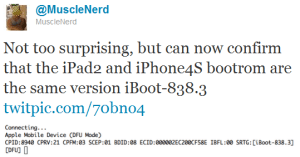
iPad 2 and iPhone 4S have same Bootrom


“Both the iPad 2 and iPhone 4S have the same bootrom.” Via MuscleNerd, it is the name of iPhone’s new play. I can put the next dialog as one of William Shakespeare Quotes. Read, Listen, and enjoy:

MuscleNerd: Not too surprising, but can now confirm that the iPad2 and iPhone4S bootrom are the same version iBoot-838.3.


p0sixninja: Current progress is going smoothly, but we can’t exactly jailbreak a device until we have one to test on


MuscleNerd: @p0sixninja well you do have an iPad2, that should be enough to see if it works:)


MuscleNerd words to P0sixninja points to some doubt that the team really has 5 userland jailbreak exploits.

Additionally, the popular hacker Stefan Esser known as i0n1c tweeted that the iOS 5 untethered jailbreak is already under work but it won’t be released until the iPhone 4S and iPad 2 are jailbroken too. The point is to prevent loss of more exploits.

Everything looks to be good. The jailbreaking process of A5 devices has now started. We’ll just watch now and bring the updates to you.

Posted in iPad, iPhone | Tagged , , , , , , , , , | Leave a comment

October 16 is Steve Jobs Day


California’s governor has chosen a day to dub as Steve Jobs Day: Oct. 16, the same date Apple will hold a memorial at Stanford University.

In a tweet sent to his more than 1 million followers Friday night, Gov. Jerry Brown said, “This Sunday will be Steve Jobs Day in the State of California.”

Jobs died Oct. 5 and was buried two days later during a small private funeral. Since his passing, the world — including U.S. President Barack Obama, Microsoft’s Bill Gatesand Facebook’s Mark Zuckerberg — has mourned his passing and celebrated his achievements.

Several memorials also have cropped up to honor the man who co-founded Apple with Steve Wozniak. The New York Times reported Friday night that Oct. 16 also will be when Apple holds a memorial for Jobs at Stanford University for “prominent Silicon Valley executives.” Jobs famously gave a commencement speech at Stanford in 2005.

Previously, Apple announced it would put on an employees-only memorial on Oct. 19 at company headquarters in Cupertino, Calif

Posted in iPad, iPhone, iPod | Tagged , , , , , , , | Leave a comment

iPhone 4S Drop Test


This is the first iPhone 4S drop test.

For those who accidentally drop their iPhones, Apple has introduced a $99 AppleCare+ for the iPhone plan which extends repair coverage on your device to two years. AppleCare+ covers two incidents of accidental damage for $49 per incident.

Posted in iPhone | Tagged , , , , | Leave a comment

Use Gevey Sim on iPhone 4 with iOS 5


Do you have your iPhone 4 unlocked using Gevey SIM and want to upgrade to iOS 5? If so, you can unlock iPhone 4 running iOS 5 using Gevey SIM but you’ll need to follow few steps before doing that. In order to unlock iOS 5 with Gevey SIM, you’ll need to preserve your unlockable iPhone 4 baseband.
You’ll need the new Redsn0w’s “Custom IPSW” option which is included on Mac OS X only. Windows version of Redsn0w 0.9.9b5 coming soon along with new Ultrasn0w later today to unlock iOS 5 (only for current unlocked devices, no new unlock).

You’ll need to download iOS 5 from here, iTunes 10.5 from here and Redsn0w 0.9.9b5 from here. Now you’re ready, below is the guide to preserve iPhone 4 baseband.

STEP 1: Connect your iPhone 4 into you computer then open Redsn0w 0.9.9b5.

STEP 2: Now select Extras then “Custom IPSW” option so that you can create your pre-jailbroken custom firmware.

STEP 3: Redsn0w will start cooking your custom IPSW and you’ll get it in few minutes.

STEP 4: Once you get your firmware, select ‘Pwned DFU’ from RedSn0w.

STEP 5: Follow the on-screen instructions to get your iPhone in DFU mode.

STEP 6: Once it’s in DFU mode, close Redsn0w then open iTunes 10.5 downloaded above and you should get your iPhone in Recovery Mode message.

STEP 7: Now hold the Option key on Mac and hit Restore. Point iTunes to your iPhone 4 Custom iOS 5 IPSW which begins with NO_BB. (WARNING: Don’t select the stock one or you’ll lose your unlock)

Posted in Uncategorized | Tagged , , , | Leave a comment

New Redsn0w Allows Creation Of Custom Firmware


The iPhone Dev Team has just released download redsn0w 0.9.9b5 which brings iOS 5 jailbreak with automatic IPSW detection for the new software update. You won’t need to manually point redsn0w 0.9.9 b5 to the iOS 5 firmware file.

Redsn0w 0.9.9b5

Redsn0w 0.9.9b5 also brings the new & waited feature: Custom IPSW. Yes, redsn0w 0.9.9b5 now acts just the same as previous PwnageTool. The fusion of Redsn0w and PwnageTool was announced earlier today before the iOS 5 release.
Unfortunately, redsn0w 0.9.9b5 is only available for Mac OS X users (just for now). The iPhone Dev Team will be updating the tool, after more tests, to bring support for Windows users.

Redsn0w 0.9.9b5 changelog

With today’s official iOS5 release, redsn0w has been updated to 0.9.9b5 to include the public URLs for the IPSW files.  This way, first-time iOS5 jailbreakers don’t need to supply the IPSW file manually.  It’s still a tethered jailbreak on all except the old-bootrom iPhone3GS, and it doesn’t apply to iPad2 or the upcoming iPhone4S.

Because the jailbreak is currently only tethered for most devices, we’re not going to release a new PwnageTool yet.  Instead, we’ve decided to build some of PwnageTool’s functionality into redsn0w (since you need redsn0w to “Just boot tethered” on every power cycle anyway).  The new “Custom IPSW” button on the Extras screen will create a custom IPSW without the baseband update for 4.3.3 or 5.0gm (iPhone3GS and iPhone4 only, for now).  Remember not to accidentally restore to the stock IPSW after you create the custom one!  The custom one begins with NO_BB_ (for “no baseband”).

You must enter “Pwned DFU” mode before trying to use the NO_BB_ IPSW with iTunes (and your hosts file cannot be pointing to Cydia’s servers due to the new blob nonce mechanism they’re using in iOS5).

Version 0.9.9b5 only available for Mac for now, until we can do more testing on the Windows version of “Custom IPSW”.

We’re currently working on a normal compatibility update for existing ultrasn0w unlockers.  After that we’ll try to fix the iBooks issue on jailbroken iOS5.

NOTE: This is a tethered jailbreak for all devices except for iPhone 3GS old bootrom (untethered). iPad 2 is not supported. Untethered iOS 5 jailbreak for iPad 2, iPhone 4S and all devices is likely coming out soon, more details here.

You can download Redsn0w 0.9.9b5 from the below links:

Download Redsn0w 0.9.9b5 for Mac OS X

Posted in iPad, iPhone, iPod | Tagged , , , , , | Leave a comment

How To Use iMessage


Yesterday, Apple has released iOS 5 for iPhone 4S, iPhone 4, iPhone 3GS, iPod touch 3G, iPod touch 4G and iPad with more than 200 new feature. One of this new features is iMessage.

How to use iMessage – But first let’s see what is iMessage :

First of all, iMessage and Messages are not seperate apps, iMessage is integrated in Messages. iMessage is a new messaging service for all iOS 5 users. iMessage allows you to send free and unlimited text messages via Wi-Fi or 3G (or EDGE) from iPhone, iPod Touch or iPad to anyone with one of those devices that runs iOS 5 or above.

How to use iMessage ?

iMessage is built into the Messages app, so you can send text, photos, videos, locations and contacts. iMessage is like BBM in BlackBerry. Keep everyone in the loop with group messaging. iMessage also let you track your messages with delivery receipts and optional read receipts, see when someone’s typing.

Important notes before using iMessage :

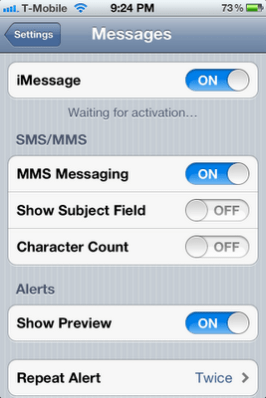
  • You can enable / disable iMessage from Setting app under Messages
  • If any message can’t be sent via iMessage, it sent automatically using SMS service.
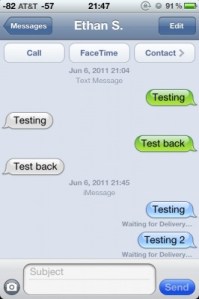
  • SMS messages are in green bubbles – iMessages are in blue bubbles
  • Unregistered users’ names in iMessage appear in red color.
Posted in iPad, iPhone, iPod | Tagged , , , , | Leave a comment